All Posts


前回の記事では、学生であれば無料で利用可能なオンライン学習コース「Skill Builder for Students」のProgrammingコースについての概要を紹介しました。今回は引き続きまして、Visual Analytics and Visual Statisticsコースについて紹介していきます。 データアナリティクスへの興味・関心は近年急激に増加しています。ただ特に学習を始めた学生では、データアナリティクスと聞くと、どうしても複雑なモデルを組むことや機械学習を実施することだけに意識が向いている印象を受けます。しかしデータアナリティクスの本質はそこではありません。根幹にあるのは意思決定や業績の改善にどれほど貢献できるかです。データの可視化、見える化は学生ですとしばしば軽視されがちな部分ではありますが、意思決定や現状の把握においては非常に有用な有用な方法の一つです。 今回紹介するコースではSAS Viyaプラットフォーム上でSAS Visual AnalyticsとSAS Visual Statisticsを使用し、様々な可視化方法、予測モデルについて学習を行います。これらを学習することによってデータに潜む傾向やパターンを把握し、そしていかにその後のリスク管理や傾向の予測などへとつなげていくかといった実践的なデータアナリティクスを学ぶことが可能です。またSAS ViyaはSASによるプログラミング以外にもRやPythonといった他のプログラミング言語をサポートしているため、SASのコーディングができない方であっても不自由なく利用することが可能となっています。 Visual Analytics and Visual Statisticsコースへのアクセスは以下の手順です。 Skill Builder for Studentsへログイン 「Learn SAS」というタブをクリック 画面中央の「Start Learning」をクリック 「Visual Analytics and Visual Statistics」をクリック 展開される各種e-learningコースをクリック 画面下部にある「enroll」をクリック Visual Analytics and Visual Statisticsコースの概要 本コースは SAS Visual Analytics 1 for SAS


Inequities in cancer care cause specific populations in the U.S. and worldwide to bear a more significant burden of disease than the general population, based upon barriers. These barriers to prevention and care have long existed but were undeniably exacerbated by the COVID-19 pandemic. February 4 marks World Cancer Day, which


Talking to others about our health isn’t always easy, especially when it comes to cancer. However, many cancer survivors take comfort in sharing their stories and hearing the stories of others. “Every cancer story is unique, just like every cancer is unique” says Elizabeth Creech, Digital Marketing Manager at SAS.


Conceptos como industria 4.0, Machine Learning, Deep Learning o transformación digital hace unos años generaban expectativas de lo más ambiciosas y eran motivo de inversión en las plantas industriales. Sin embargo, en muchos de los casos, el resultado de todo ello han sido multitud de proyectos piloto sin éxito y


SAS' Pankaj Telang shows you new image-specific processing capabilities in SAS Visual Data Mining and Machine Learning.


Just over a year ago, we announced our strategic partnership with Microsoft. This partnership is critical to the way we serve our joint customers’ needs as they migrate and modernize with SAS® Viya® in the Microsoft Cloud. Here are five reasons why. Happy customers It all comes down to happy customers.


Amid historical and structural barriers, “quality cancer treatment for all” is a simple credo that is not easy to put into action. Cancer is recognized as a leading cause of death, accounting for more than 10 million deaths globally in 2020, according to the World Health Organization. Globally, people with


Some co-workers head home after a day at the office. Xin Hunt, Sr. Machine Learning Developer, Ralph Abbey, Sr. Manager - Advanced Analytics R&D, Michael Lamm, Sr. Research Statistician Developer, Ricky Tharrington, Machin Learning Developer, head to our campus Recreation & Fitness Center for a workout and laughs. The friendship
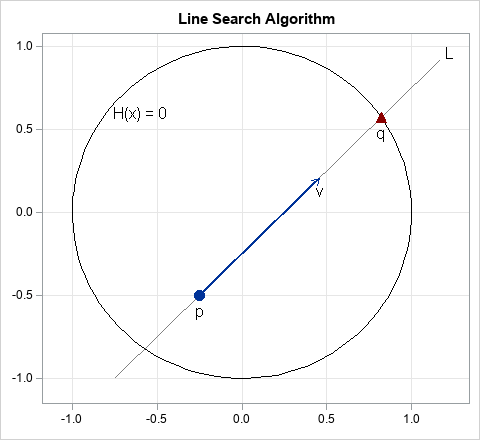

Recently, I needed to implement a line search algorithm in SAS. The line search is illustrated by the figure at the right. You start with a point, p, in d-dimensional space and a direction vector, v. (In the figure, d=2, but in general d > 1.) The goal is to


When we moved out to the country with our two dogs, our oldest dog Todd suddenly decided he liked to howl…. And he would do so every time we left the house. Maybe it was the country air? Maybe it was a time-lapse gene? Maybe he just wanted to learn
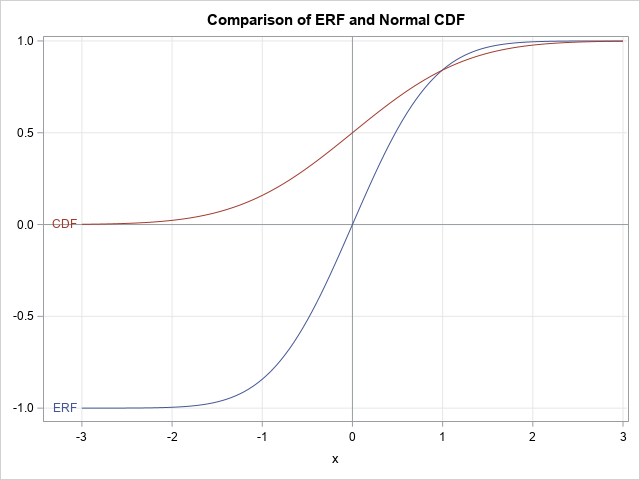
Recently, a SAS programmer commented about one of my blog posts. He said that he had found an alternative answer on another website. Whereas my answer was formulated in terms of the normal cumulative distribution function (CDF), the other answer used the ERF function. This article shows the relationship between


This article introduces how to solve the pirate game with a recursive solving algorithm in SAS, and how to analyze and visualize the law behind the complex logic of the pirate game. If you join in a pirate game next time, you can know your destiny ahead of time to reap the benefits and avoid getting killed.
前回の記事では、学生であれば無料で利用可能なオンライン学習コース「Skill Builder for Students」についての紹介を行いました。このSkill Builder for Studentsには5つのコースが準備されており、今回の記事ではProgrammingコースについての概要を紹介します。このコースではSASプログラミング言語、そのコーディング方法について学習を行います。 近年、データ解析をプログラミングをせずに行うGUIデータ分析ツールが普及し始め、SASからもEnterprise Guideといった製品が提供されており、データ分析の民主化が進んでいます。もちろんこういったツールによって多くの人がデータ解析に関わる各種機能にアクセスできるようになったことは大変大きなメリットです。 しかし、もし将来データ解析を行う職に就きたいという思いがあるのであれば自分でコードを書き、前処理や解析を行うことができるようになるべきだと個人的には考えています。あくまで個人的な意見になりますがツールに依存してしまうと解析や前処理で実行できることには限界がありますし、またデータに関連する分野の学生であればシミュレーションなどを自由に行うことも難しいです。誤解がないように言うとGUIツールを使うことが悪というわけではなく、GUIのほうが生産性や共有性が高い場面もありますが、いざという時に自らの力で実装できるというのがプロフェッショナルなのではないでしょうか? この記事を見ている方の大部分は、今後データ解析に本格的に携わっていきたい、自らのスキルを増やしたいという方だと考えています。このコースを修了したからと言ってデータ解析のプロフェッショナルになれるかというとそうではありません。しかし、その第一歩としては非常に良い内容だと思います。私自身もこのコースを受講しています。ぜひ一緒に学びましょう!! Programmingコースへのアクセスは以下の手順です。 Skill Builder for Studentsへログイン 「Learn SAS」というタブをクリック 画面中央の「Start Learning」をクリック 「Programing」をクリック 展開される各種e-learningコースをクリック 画面下部にある「enroll」をクリック コース内にある各レッスンではそれぞれのテーマに沿った内容が動画で紹介がされており、また適宜「Activity」や「Practice」という形で問題も出題されています。学生という立場からの個人的な感想ですが、単に動画を視聴するだけではなく、手を動かしつつ学習を行うことができるという点は非常に良いと感じています。デモとして紹介されている内容についてもプログラミングコードやデータセットも提供がされているので、動画を見つつ別画面で同じ手順を踏むとより理解も深まるかなと思います。 なおこのオンライン学習コースはすべて英語での提供です。もし英語が苦手でちょっと....という方は、動画の下部に動画の内容がすべてテキスト化されているので、適宜翻訳をかけつつ学習を行っていただければいいかなと思います。 Programinngコースの概要 programmingコースでは統計解析を行うためのプログラミングだけではなく、そもそものSASプログラミングの構成や、グラフ・レポートの作成、マクロなどを幅広く学ぶことができます。この記事の最後にあるように8つの項目に分かれており、各項目にはさらに複数のLessonが準備されています。各項目に含まれるLessonをすべて終了すると学習完了を証明する「SAS digital Learn Badge」(下図)が発行されます。 コース内容を実行する環境としては大きく3つあります。 SAS Virtual LabのSAS Studio SAS OnDemand for Academics のSAS Stuido 自らが契約しているSASソフトウェア ただ、今回の学習にあたり推奨するのは一番上の「SAS Virtual Lab」です。各コースでは様々なデータセット、プログラミングファイルを使いますが、SAS virtual Labではそれらがすべて既に保管されています。SAS


La analítica y la ciencia de datos ofrecen un amplio abanico de oportunidades profesionales. Desde el equipo de Academics de SAS trabajamos de forma muy estrecha con las instituciones educativas para introducir estas disciplinas dentro de su oferta formativa, así como para ofrecer una primera oportunidad laboral a los estudiantes.


Many SAS programmers use macros. I have seen students in my SAS classes use several methods to activate their macros. One way is to load the macro in the Display manager or editor in SAS OnDemand for Academics and submit it. Another technique is to use the statement %Include macro-name.