SAS Users
Providing technical tips and support information, written for and by SAS users.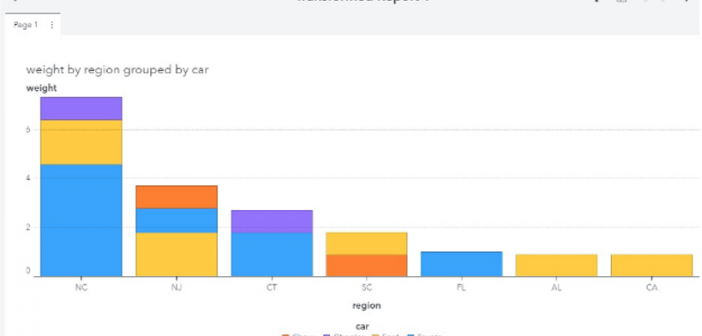

There are three types of visualization APIs defined in the SAS Viya REST API reference documetation: Reports, Report Images and Report Transforms. You may have seen the posts on how to use Reports and Report Images. In this post, I'm going to show you how to use the Report Transforms
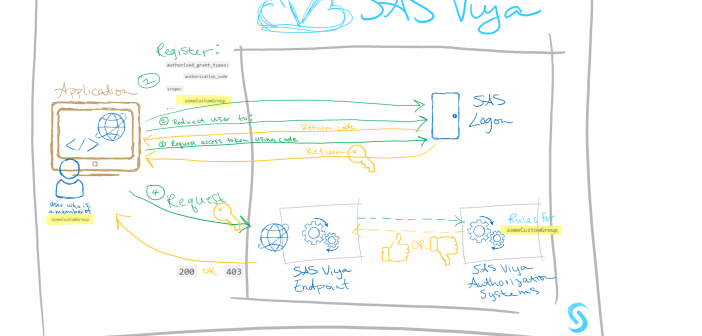

This is the third installment of a series focused on discussing the secure integration of custom applications into your SAS Viya platform. I began the series with an example of how a recent customer achieved value-add on top of their existing investments by building a custom app for their employees
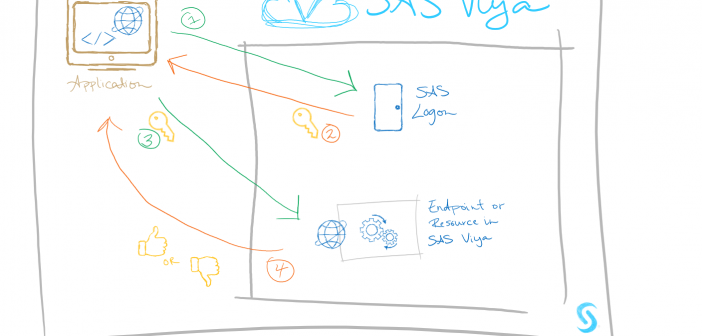
Welcome back! Today, I continue with part 2 of my series on building custom applications on SAS Viya. The goal of this series is to discuss securely integrating custom-written applications into your SAS Viya platform. In the first installment of this series, I outlined my experiences on a recent project.