Overview
The modern enterprise runs on a complex web of applications, websites, and internal tools. When these systems fail, the burden falls on the "User Attendance Center" (UAC). Every day, UAC departments are inundated with a relentless stream of incidents, and their ability to keep the business moving relies entirely on their capacity to manage and answer these requests using their internal knowledge base.
For Data Scientists, this scenario is more than an operational bottleneck; it is a quintessential "golden use case" for Agentic AI. Traditional search-based Retrieval-Augmented Generation (RAG) models are not enough.
The next generation of AI solutions requires an orchestrated flow. By integrating business rules, sophisticated text analysis, and RAG-LLM models, we can assist UAC departments in finding the precise technical answer as fast as possible. This article explores how practitioners can use the newly introduced SAS Agentic AI Accelerator to engineer this transformation.
Agentic AI is changing the enterprise AI paradigm: rather than simply generating outputs, AI systems can now complete tasks and make decisions autonomously. The real challenge, however, is not autonomy, it is trust. In practice, organizations need agents that are secure, transparent, traceable, governable, and monitorable over time.
The SAS® Viya® Agentic AI Accelerator is a free framework designed to help SAS Viya users to build governed and trusted AI agents by integrating Large Language Models (LLMs) in the easiest and safest way possible, with governance and operationalization in mind. It enables you to:
- Integrate any LLM (proprietary or open, online or offline) with security, trust, and transparency, leveraging SAS Model Manager as the central model registry.
- Experiment, compare, version, govern, and monitor prompts to continuously improve accuracy and reliability—while packaging artifacts automatically for governance and deployment.
- Combine business rules, LLMs, and traditional ML models to balance accuracy vs. transparency and autonomy vs. human-in-the-loop oversight.
- Deploy and monitor agent performance over time, with traceable decision logic and explainability.
- Do all the above through a no-code interface, making agent creation accessible beyond purely technical roles.
This article walks you through a complete demo use case: a multi-agent workflow that processes support tickets.
This is not a theoretical application. The challenge faced by the UAC is a common struggle applicable across different companies. The need to deliver rapid, accurate, and compliant internal support is universal.
Solution Overview
The solution is based on 3 main layers:
1. Building blocks
AI models and agents form the foundation of the solution. These include text analytics models for categorization and entity extraction, built with SAS Visual Text Analytics, a RAG‑based model to propose responses for complex or unknown cases, and an LLM‑based validation agent to assess the relevance and quality of generated responses. Each component performs a well‑defined task and can be independently evolved, tested, and governed.
2. Orchestration and decision logic
All models, agents, and business rules are orchestrated within SAS Intelligent Decisioning, which defines the end‑to‑end process flow followed by each ticket. This orchestration layer ensures that decisions follow a controlled and auditable path, combining automation with human‑in‑the‑loop oversight where required.
3. Governance and Trust
SAS Model Manager provides centralized governance for all analytical assets involved in the solution, including traditional models, LLM references, and prompts. Versioning, approval workflows, and monitoring capabilities ensure that the full agentic process can be deployed, observed, and refined over time. In addition, SAS Intelligent Decisioning ensures that the complete decision logic is traceable and auditable, enabling trusted AI at scale.
This design enables a hybrid approach by design: deterministic and explainable analytics are used wherever possible, while generative AI is applied only where flexibility and reasoning add clear value. Supported by the SAS Agentic AI Accelerator, all components are governed and monitored to ensure trust, control, and operational transparency throughout the lifecycle of the agent.
Step-by-Step Construction
Let’s walk through the steps required to build the AI agent using SAS Viya and the SAS Agentic AI Accelerator. Each step illustrates how you can create your own AI agent, from building the core components to orchestrating and operationalizing a trusted workflow aligned with real UAC processes.
Step 1: Build ticket categorization and entity extraction models using SAS Visual Text Analytics and register them with SAS Model Manager.
The first step consists of building the deterministic foundation of the agent using SAS Visual Text Analytics. A text categorization model is trained on historical UAC tickets to classify incoming requests into known scenarios, while an entity extraction model is used to identify key information such as names, applications, references, or urgency indicators.
Once trained and validated, both models are registered and published in SAS Model Manager, making them governed, versioned assets that can be safely reused and orchestrated downstream. These models provide structured and explainable signals that later guide routing decisions and ensure that generative AI is applied only when required.
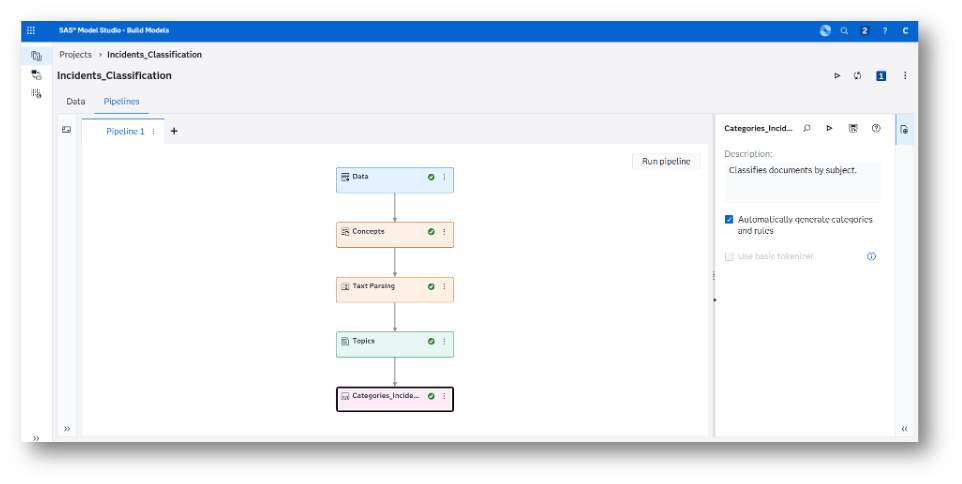
- Open SAS Model Studio and create a new Text Analytics project. Use a data table containing historical UAC tickets, including the incident text and the corresponding ticket categories, to train a text classification model.
- Select the input variables that contain the ticket text (for example, description or subject fields) and the target variable that represents the ticket classification.

- Use the Concepts node to define the business concepts required by the use case. For example, you can include LITI rules to identify the types of applications and systems supported by the UAC, enabling consistent and explainable entity extraction.
-
Use the Categories node to build the text categorization model, either by:
- leveraging historical labeled data, or
- defining business rules that explicitly describe how categories should be assigned.

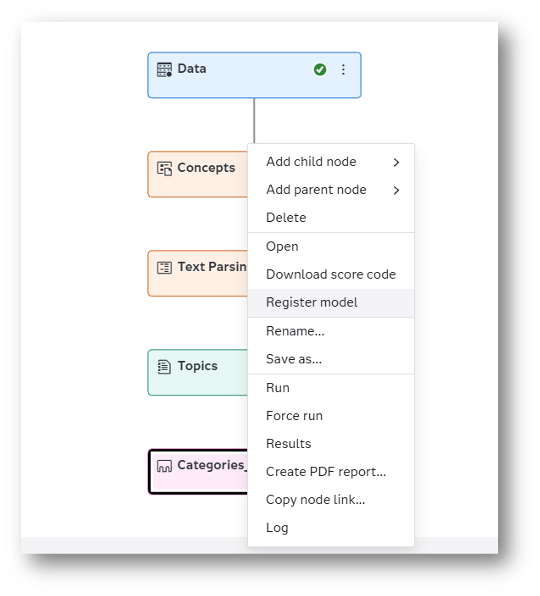
- Once the models are properly adjusted and validated, select the Register Model option. This action stores the trained models in SAS Model Manager, where they can be versioned, governed, reused, and monitored as part of the agentic workflow.

Step 2: create a Retrieval-Augmented Generation (RAG) model using SAS RAM and register it in SAS Model Manager.
The next step extends the agent to handle complex or unknown cases by creating a Retrieval‑Augmented Generation (RAG) model using SAS RAM. The RAG approach combines an LLM with relevant knowledge sources, allowing the agent to generate responses grounded in trusted content and reducing the risk of hallucinations.
Once configured and validated, the RAG model is registered and published in SAS Model Manager, ensuring it is versioned, governed, and ready to be orchestrated as part of the agentic workflow.
- Open SAS Retrieval Agent Manager (SAS RAM) and define the knowledge sources that will be used to ground the responses, such as internal documentation, manuals, FAQs, or other knowledge bases relevant to UAC operations.


- Create a new collection where you can experiment with different embedding models and chunking strategies. Use this space to validate and compare retrieval quality and relevance across configurations.
- Once the RAG configuration is validated, register the RAG model in SAS Model Manager, enabling versioning, governance, and reuse within downstream agentic workflows.
Step 3: experiment and register a prompt to define an LLM-based agent to assist with unknown cases.
In this step, an LLM‑based agent is defined to support cases that cannot be resolved through predefined responses or the RAG approach, providing additional assistance for open or ambiguous situations. Using the SAS Agentic AI Accelerator, different prompt variants are experimented with to guide the LLM’s behavior, tone, and constraints when generating response proposals.
Once the prompt is validated, it is automatically packaged and registered in SAS Model Manager, becoming a governed and versioned asset. This ensures the LLM‑based agent can be safely orchestrated within the workflow and refined over time without compromising transparency or control.
- Open the Build Prompts menu in the SAS Agentic AI Accelerator. Select or create a SAS Model Manager project and create a new prompt.
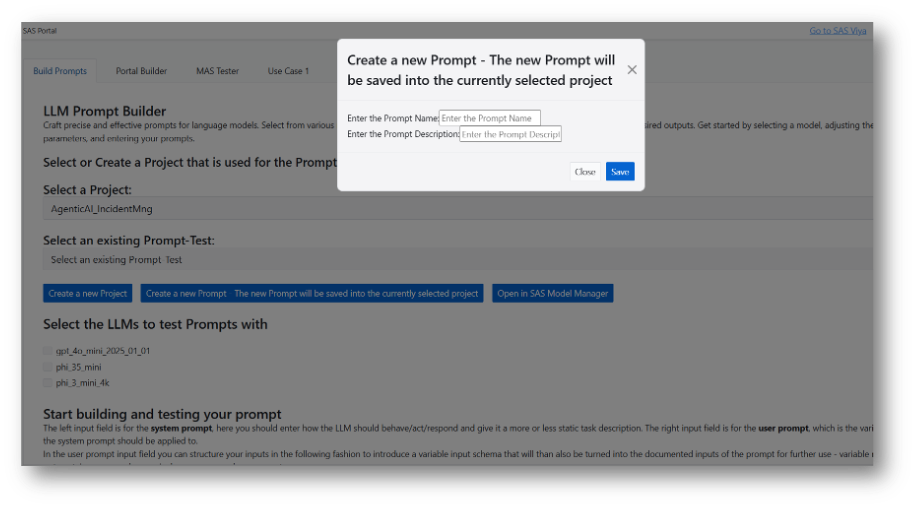
- Select the LLMs to test prompts with and start building and testing your prompts. Create multiple prompt variants to experiment with different formulations and guidance strategies and test each prompt variant against sample tickets and compare results to evaluate response quality, consistency, and safety.

- Select the best‑performing prompt and finalize the configuration.
- Manifest Best Prompt to register the prompt as a governed asset in SAS Model Manager, where it is automatically built, versioned and made available for orchestration.
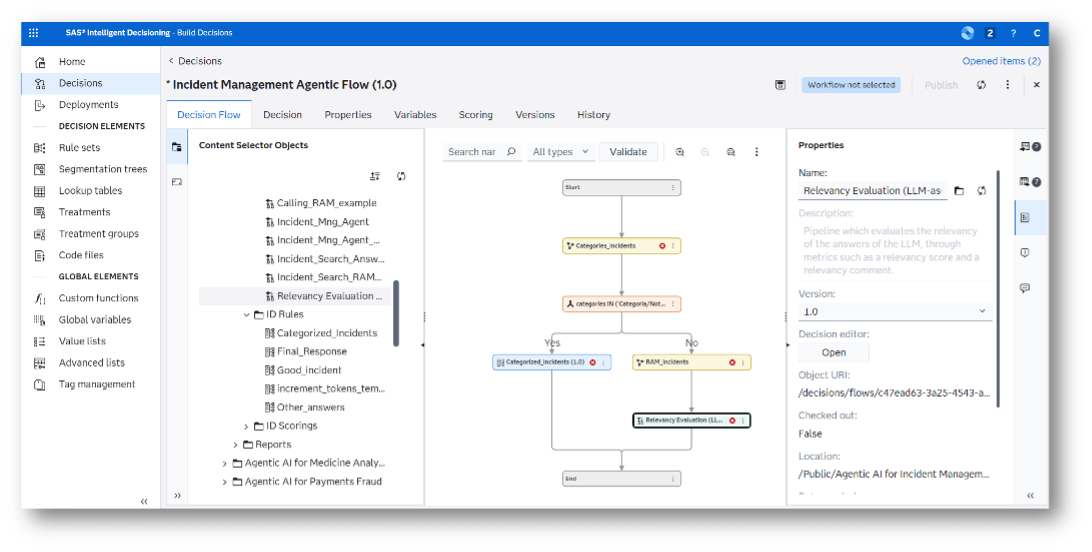
Step 4: Model the ticket-handling process in SAS Intelligent Decisioning.
Now, the end‑to‑end ticket‑handling process is modeled in SAS Intelligent Decisioning to orchestrate all previously created components. The decision flow defines how tickets move through categorization, entity extraction, RAG assistance, and LLM‑based support, based on confidence levels and business rules.
This orchestration layer centralizes the process logic, ensures consistent routing, and enables controlled automation with human‑in‑the‑loop oversight where required. As a result, every action taken by the agent follows a traceable, auditable, and governed path aligned with real UAC operating procedures.


- Open SAS Intelligent Decisioning and create a new decision flow.

- Sequentially add the text analytics models (concepts and categories) from the SAS Model Manager repository to the decision flow.

- Incorporate a branch node to control routing logic and escalation paths based on business criteria.
- Add business rules to define the proposed response for known questions.
- Add the RAG model to the corresponding paths in the decision flow to provide grounded response proposals for complex or unknown cases. Add the LLM‑based agent prompt followed by Call LLM node (part of the SAS Agentic AI Accelerator), and combine these components with the necessary decision nodes, business rules, and transitions to accurately represent your UAC ticket‑handling process, including routing, escalation. To organize an orchestrated agentic AI workflow, you can define specialized decision flows for different parts of the process.


- Add missing variables to populate input and output variables, then save and validate the decision flow.

Step 5: Add an LLM-based validation agent to score responses.
In this step, an LLM‑based validation agent is added as a guardrail to assess the relevance of the proposed responses before they are acted upon. The validation agent evaluates each response against the original ticket context and returns a score, along with qualitative feedback highlighting potential gaps or risks.
This guardrail plays a key role in controlling the autonomy of the agent, ensuring that only high‑quality responses can progress, while uncertain or risky cases are prioritized for mandatory human review. As a result, the solution balances automation with oversight, optimizes the workload of support staff, and strengthens trust, accountability, and operational reliability.
Step 6: test the flow to ensure full transparency and traceability.
Once all components are connected, the complete decision flow is tested using representative ticket scenarios. This validation phase ensures that each step of the process behaves as expected and that routing decisions, agent outputs, and validation results are correctly logged.

Testing also allows practitioners to verify end‑to‑end traceability, including which models, prompts, rules, and agents were used for each ticket, ensuring that outcomes are explainable and auditable throughout the workflow.


Step 7: Package, govern, deploy, and monitor the agent.
In the final step, the agent is packaged and deployed as a governed asset. Using SAS Model Manager and SAS Intelligent Decisioning, all models, prompts, and decision logic are versioned, approved, and published to the appropriate runtime environments.
Once in production, the agent can be monitored over time, tracking performance, validation scores, and behavioral trends. This enables continuous improvement of the agent while maintaining control, governance, and trust as requirements evolve.
Conclusion
As Agentic AI becomes a core capability for enterprise operations, trust and governance are no longer optional, they are foundational This walkthrough shows how practitioners can design an end‑to‑end agentic AI workflow that is both powerful and controllable, and how a layered, hybrid approach enables organizations to move beyond isolated RAG models toward fully orchestrated agentic workflows.
By leveraging SAS Viya together with the SAS Agentic AI Accelerator, analytics‑driven understanding, generative reasoning, and human oversight coexist within a single, governed framework. The accelerator simplifies the creation, orchestration, and governance of AI agents, enabling LLMs, prompts, rules, and analytical models to be combined transparently and operationalized at scale.
Beyond the architectural benefits, this use case delivers tangible business value. The implementation enables:
- Higher productivity, by reducing manual ticket review and accelerating solution search, resulting in cost reductions of 8–15%.
- Improved effectiveness, cutting ticket resolution times by 30–40% through faster, more consistent responses and better guidance for support teams.
- Increased application and user satisfaction reflected an estimated 10% improvement in NPS, driven by fewer unnecessary iterations and clearer responses.
- Scalable best practices, with standardized and validated responses that reduce dependency on individual expertise and increase the number of resolved tickets by around 20%.
The result is an enterprise‑ready Agentic AI solution that can evolve over time, support critical operational teams such as UAC, and deliver automation with confidence—combining autonomy with transparency, and innovation with control.
To explore how this approach can be implemented in practice, learn more about SAS Agentic AI Accelerator and discover how to build, govern, and scale AI agents in enterprise environments.
Learn more
- Agentic AI for Workforce Analytics: Reducing attrition with personalized, LLM-powered guidance
- How Agentic AI Accelerates SME Credit Decisions with SAS Viya
- From fraud detection to fraud resolution: Building an AI voice agent with SAS Viya and LLMs
- Unlocking agentic AI potential with MCP tools in SAS Retrieval Agent Manager
- A New Frontier for AI Agents: Cybersecurity