
Most analytical journeys start the same way – with a question.
When did we have the highest profit?
Which customers are driving growth?
What segment should we look at next?
In traditional analytic workflows, turning those questions into answers often requires navigating menus, configuring visuals, writing calculations and interpreting results before a story emerges.
Embedded directly in SAS Visual Analytics, Copilot introduces a conversational AI assistant that helps users explore data, create reports, and interpret insights through natural language. By combining generative AI with the analytical capabilities of the SAS Viya platform, Copilot transforms business questions into analytical actions, recommendations, and explanations – creating a more fluid analytics experience.
Let's explore how Viya Copilot can help you move from question to clarity faster than ever.
Analytics that meets you where you are
Analytics doesn’t happen in a single step. It unfolds across stages:
- Exploring and shaping data.
- Building visualizations and reports.
- Interpreting insights.
SAS Viya Copilot supports users throughout this journey – users simply need to ask.
A more natural way to work with data
Understanding the data is at the center of answering any business question. For many users, this early stage of analysis can take time – especially when working with unfamiliar datasets.
Within SAS Visual Analytics, Copilot simplifies this process by acting as a guide to the data – helping users explore, understand and prepare their data for further analysis.
-
- To make the data fit-for-purpose, Copilot can change a data item’s properties – including the label, format and aggregation.
- Copilot can also assist with common data transformations, including creating groups or bins from categories, defining hierarchies, and preparing data items for time-based or geospatial analysis.
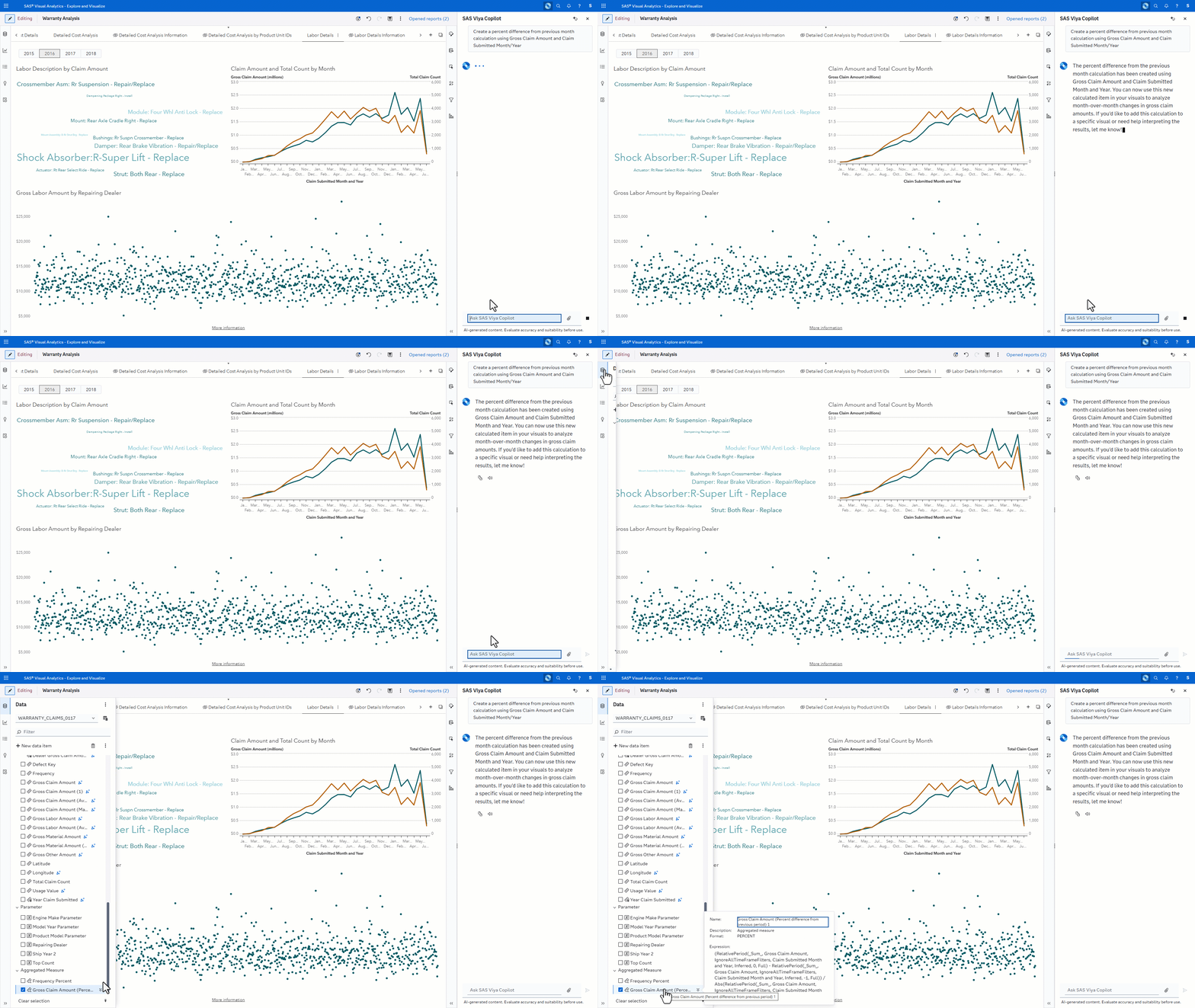
- Preparing data often requires creating entirely new calculations to answer a particular question. Instead of manually writing expressions to determine growth rate or profit margin, Copilot can generate new calculations from simple natural language.
This conversational interface lowers barriers for business users while accelerating exploration for experienced analysts.
From data to visuals – faster
Designing dashboards and reports often involves a series of manual steps – selecting visuals, assigning data roles, adjusting formatting, and refining layouts. Copilot helps streamline the process, enabling users to go from raw data to meaningful visual stories faster.
- Copilot can generate new report pages from scratch, automatically creating relevant visuals - like charts, tables, and other content like titles, headers and footers – based on your business question or area of analysis.
- Designing dashboards is an iterative process – Copilot can refine existing reports by adding new visuals to the report page, replacing or changing existing visuals to show data in a different way, or deleting visuals or other content that are no longer relevant.
- Copilot can focus insights by applying filters, ranks, display rules or interactions to existing visuals, helping narrow attention to the most relevant information.
The goal is to remove friction from the workflow so users can work more efficiently. By automating many of the tasks involved in report building, Copilot enables designers to focus their time on communicating the story behind the data.
Insights only a question away
Reports and dashboards provide insights – and often lead to brand new questions. The conversational nature of Viya Copilot allows users to ask questions about their data and quickly receive tailored on-the-fly responses in real time.
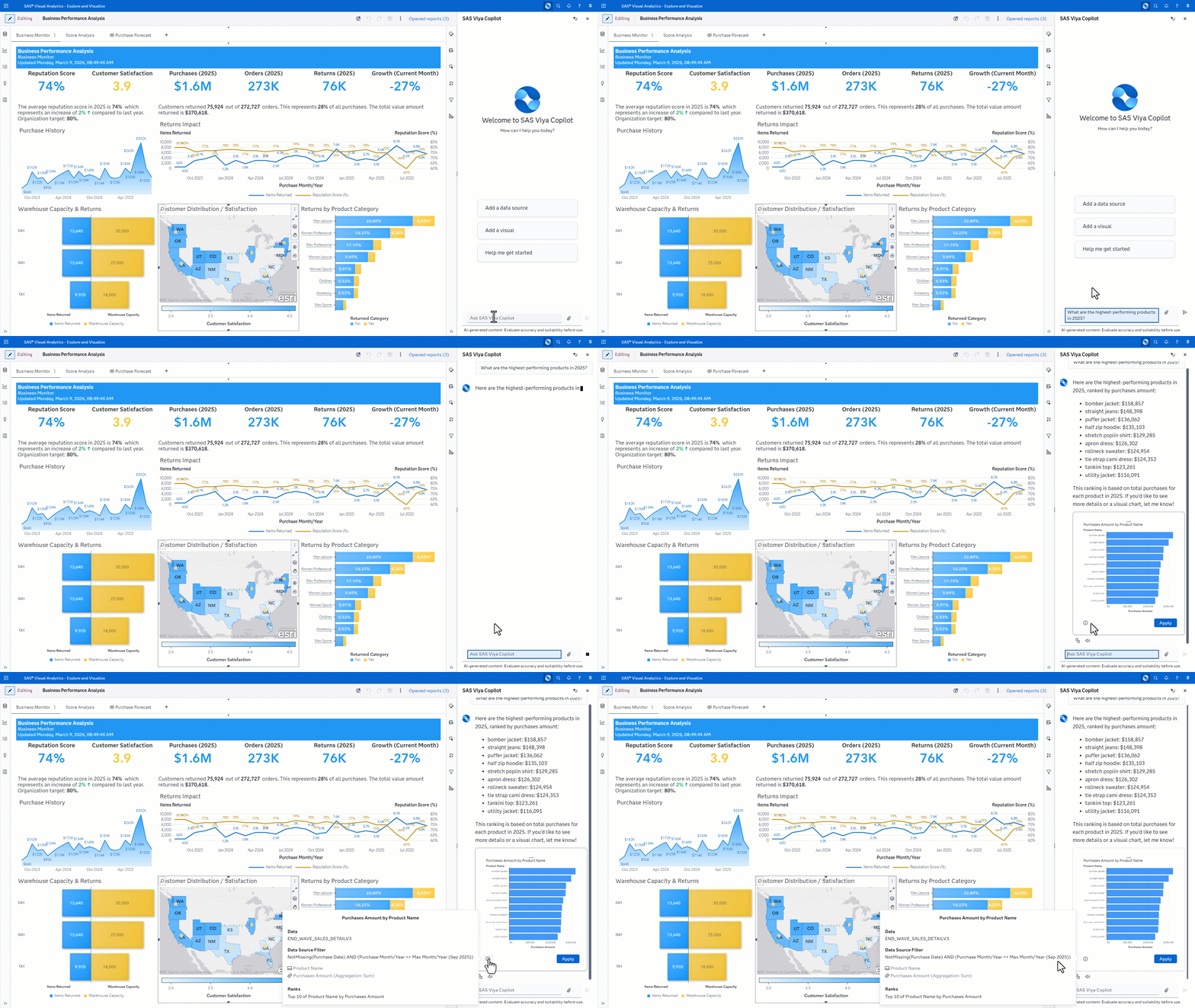
- Copilot can create ad-hoc visualizations that help answer a user’s question. The categories, measures, and any additional logic – such as applied filters or ranks – are visible to the user, ensuring transparency into how the insight was produced.
- New questions often emerge mid-analysis. Copilot retains the conversational context from earlier interactions to handle follow-up questions seamlessly.
- Copilot can summarize visualizations, highlight key trends, and generate visual explanations that help users better understand relationships between important variables.
In this way, curiosity becomes part of the workflow. Questions surface and can be explored immediately with Copilot acting as a collaborative AI assistant.
A faster path from curiosity to clarity
SAS Visual Analytics has long included augmented analytics capabilities that automatically surface insights, highlight drivers, and explain outcomes. Viya Copilot builds on that foundation by adding generative AI to the experience.
With Copilot, analytics becomes conversational. This creates a more collaborative relationship between the user and the analytics platform - one where the system actively helps users navigate their analytical journey.
In the next blog post, we’ll focus on the Copilot capabilities available outside of the chat pane – embedding GenAI experiences directly into the user workflow for targeted assistance.