 If you're a SAS programmer who now uses SAS Viya and CAS, it's worth your time to optimize your existing programs to take advantage of the new environment. This post is a continuation of my SAS Global Forum 2020 paper Best Practices for Converting SAS® Code to Leverage SAS® Cloud Analytic Services and my SGF 2020 Super Demo.
The best approach for refactoring SAS code for SAS Viya has a few steps:
- First, "lift and shift" your existing code to run successfully in the compute server for SAS Viya.
- Next, create CASLIB statements to all of your data sources: i.e. sas7bdat, CSV files, parquet files, relational databases, cloud data sources, etc.
- Finally, identify the longest running steps so you know where you have the biggest opportunities. For example, look at steps where the "real time" is 30 minutes or longer, as well as steps that are CPU bound. CPU-bound steps are steps where the CPU time is equal to or greater than the real time for that step.
To help us identify those steps we can leverage a new utility to analyze SAS logs and create reports to help us understand the Real Time and CPU Time for each step. Read on to learn more about this final step in the code refactoring process.
Application summarizeSASLogSteps
The application will read SAS Batch Server, SAS Stored Process Server, and SAS Workspace Server logs and SAS 9 logs that end-users save to disk. It creates a descending Real Time (Clock Time) report and a step frequency report. To view the reports delivered with the application use SAS Viya. In addition to the reports the data sets all reports are based on can be found in the .../assessment/datamart/summarizeSASLogSteps directory. If you do not have SAS Viya you can process the sumlogs_results.sas7bdat using SAS 9. Here is the SAS code to accomplish that.
/* Windows LIBNAME sample*/
libname logs "C:\path\to\SAS 9 Content Assessmet Applications\v2021.2.5\assessment\datamart\summarizelogs";

/* Linux or AIX LIBNAME sample*/
libname logs "/path/to/SAS 9 Content Assessmet Applications/v2021.2.5/assessment/datamart/summarizelogs";

proc sort data=logs.sumlogs_results out=work.logs;
   by descending real_time;
run;

proc print data=work.logs;
run;

proc freq data=work.logs;
   table step;
run;
The reports are derived by picking up on SAS log entries like this:
NOTE: PROCEDURE SGPLOT used (Total process time):
      real time           2.79 seconds
      cpu time            0.08 seconds

NOTE: The SAS System used:
      real time           1:08.86
      cpu time            1:18.18
Descending Real Time Report
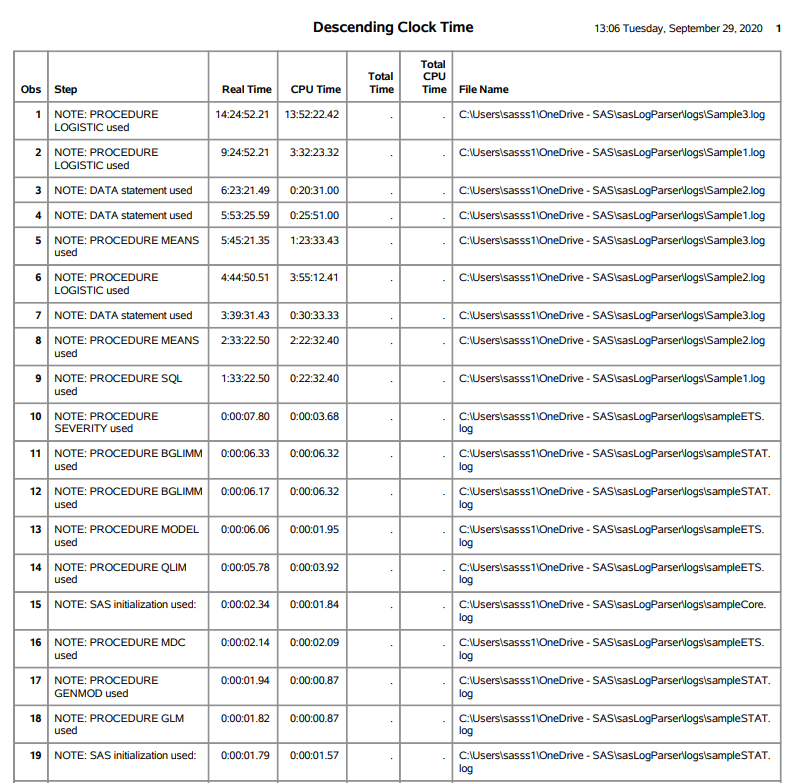
Figure 1 contains an example of the descending real time report. In this report we observe in the Step column that the longest running step is a PROC LOGISTIC that takes over 14 hours (Real Time column) and from the SAS log called Sample3.log (File Name column). The best way to use this report is to focus on steps that take longer than 30 minutes. In our case we have 9 steps from 3 SAS logs. Now that we know that we can review the details of each step and then benchmark if that step would run faster by leveraging SAS® Cloud Analytic Services (CAS). Note, for CAS to process data, all data must be in CAS tables and the step must be coded using CAS-enabled steps.
How to get the Application
The application is delivered starting with SAS 9 Content Assessment v2021.2.5. To download the application click here. The name of the application is: summarizeSASLogSteps.
Configuration
Documentation on how to configure and run the application is located in the ..../assessment/doc folder and called SASContentAssessment.pdf.
Conclusion
In order to understand which steps are good candidates for leveraging the in-memory engine CAS, we must first understand the real time and CPU time of each step. Then we can benchmark which engine in SAS Viya is appropriate for that step i.e., the compute server or CAS.

5 Comments
Hi,
I am executing utility sasLogParserStoredProcessServer.sas for stored process server logs. I am getting below error. I have enabled debug options yet I am not able to find out error solution.
I am providing you initial error message below. Let me know if you need more details from my side.
-----------------------------------------------------------------------------------------------------------------------------------------------------------------------------------------------------------------------------------------
NOTE: Character values have been converted to numeric values at the places given by: (Line):(Column).
298:156 298:61 298:240
NOTE: The infile SASLOG is:
Filename=/sasvol01/Temp/Utility/Stored/Log/SASApp_STPServer_2021-05-04_punevmsinsdi07_11446.log,
Owner Name=sasecm,Group Name=ecmgrp,
Access Permission=-rwxrwxrwx,
Last Modified=05 May 2021 00:05:05,
File Size (bytes)=83683
NOTE: Invalid third argument to function SUBSTR at line 298 column 134.
RULE: ----+----1----+----2----+----3----+----4----+----5----+----6----+----7----+----8----+----9----+----0
1 Host: 'punevmsinsdi07', OS: 'LIN X64', Release: '3.10.0-514.el7.x86_64', SAS Version: '9.04.01M5P091
101 32017', Command: '/sasvol01/SASHome1/SASFoundation/9.4/sasexe/sas -noterminal -noxcmd -netencryptalg
201 orithm SASProprietary -metaserver punevmsinsdi07.in.sas.com -metaport 8562 -metarepository Foundatio
301 n -objectserver -objectserverparms "protocol=bridge spawned spp=43245 cid=1 dnsmatch=punevmsinsdi07.
401 in.sas.com pb classfactory=15931E31-667F-11D5-8804-00C04F35AC8C server=OMSOBJ:SERVERCOMPONENT/A5S8KX
501 6N.AZ000007 cel=credentials lb multiuser port=8612 saslangrunas=client"' 572
oldline= line=-514.el7.x86_64', SAS Version: '9.04.01M5P091 step= product=SAS9Log fileName=/sasvol01/Temp/Utility/Stored/Log/SASApp_STPServer_2021-05-04_punevmsinsdi07_11446.log realtime=. cputime=. totaltime=. totalcpu=. arg1=514 arg2=el7 x=.
7 The SAS System 14:53 Tuesday, October 5, 2021
time= _ERROR_=1 _N_=1
NOTE: Invalid third argument to function SUBSTR at line 298 column 134.
RULE: ----+----1----+----2----+----3----+----4----+----5----+----6----+----7----+----8----+----9----+----0
2 Log continued from /sasvol01/SASConfigBOB/Lev2/SASApp/StoredProcessServer/Logs/SASApp_STPServer_2021
101 -05-03_punevmsinsdi07_11446.log 131
oldline= line=toredProcessServer/Logs/SASApp_STPServer_2021 step= product=SAS9Log fileName=/sasvol01/Temp/Utility/Stored/Log/SASApp_STPServer_2021-05-04_punevmsinsdi07_11446.log realtime=. cputime=. totaltime=. totalcpu=. arg1=toredProcessServer
arg2=Logs x=. time= _ERROR_=1 _N_=2
NOTE: Invalid third argument to function SUBSTR at line 298 column 134.
3 2021-05-04T00:05:05,707 DEBUG [00000141] :sassrvecm1 - STP: Session Monitor Starting Purge. 91
oldline= line=STP: Session Monitor Starting Purge. step= product=SAS9Log fileName=/sasvol01/Temp/Utility/Stored/Log/SASApp_STPServer_2021-05-04_punevmsinsdi07_11446.log realtime=. cputime=. totaltime=. totalcpu=. arg1=STP: arg2=Session x=. time=
_ERROR_=1 _N_=3
-------------------------------------------------------------------------------------------------------------------------------------------------------------------------------------
Thank You,
Sanil Divekar
@SanilDivekar, thank you for bring this to my attention. I fix that issue and you can download the new version from my gitHub repo. Here are the links:
https://github.com/sassoftware/converting-sas-code-to-leverage-cas/blob/main/sasLogParser.sas
https://github.com/sassoftware/converting-sas-code-to-leverage-cas/blob/main/sasLogParserMacros.sas Note, this file must be name sasLogParserMacros.sas and must be in the same directory as sasLogParser.sas.
It appears the link to the sasLogParserMacrosWorkSpaceServer.sas link is broken.
Where can this file be found?
I was able to find it...
https://github.com/sassoftware/converting-sas-code-to-leverage-cas/blob/main/sasLogParserMacrosWorkspaceServer.sas
However, I'm having issues trying to get information. How do I get support in running this as the instructions are not clear or I'm missing something.
Thanks!
John
@John Ward
First off thank you for the heads up on the link being broken.
Instructions:
1. download the two programs for processing Work Space Server logs to a new directory.
2. Modify line 8 and 12 in the sasLogParserWorkSpaceServer.sas file:
/* sasLogParserWorkSpaceServer.sas version 3.14 24Jun2021:11:49 */
/* Macro variable for the path to sas log parser directory */
/* Note: Ensure the path ends with the delimiter \ for Windows or / for Linux */
%let sasLogParser=C:\path\to\utility\;
/* Macro varialbe for the path containing the SAS Logs */
/* Note: Ensure the path ends with the delimiter \ for Windows or / for Linux */
%let path2files=C:\path\to\logs\;
3. Submit to SAS sasLogParserWorkSpaceServer.sas
The utility will create a "reports" directory in the directory you copied the two SAS programs to. When the utility finishes go into the "reports" directory to review the reports.
The utility is recursive so if there are subdirectory in the path you set on line 12 it will parse all ".log" files in those subdirectories too.
If you need additional assistance please send me an email at steven.sober@sas.com and I will set up a Teams meeting to help you run the utility.
Best regards,
Steve