A few years ago, I wasn't worried about AI taking over SAS programming.
In fact, I wrote about my early experiments with ChatGPT back in 2023 — and my conclusion at the time was pretty simple: interesting, sometimes helpful, but not exactly ready for real work. My tests were modest but telling. Converting a character value to numeric? Sure. Generating random data? Maybe. Implementing more advanced techniques like LOCF? Not so much.
Back then, I wasn't ready to give up my "PROC and Roll" lifestyle. Today? I'm still at it, but I'm ready to share the stage.
AI coding assistants have grown up
Fast forward to 2026, and the landscape looks very different. AI tools have improved dramatically — not just incrementally, but in ways that fundamentally change how we write code. Today's assistants bring:
- More domain knowledge, thanks to retrieval-augmented approaches and deeper connections to trusted content
- More specialization, with models tuned specifically for coding tasks
- More integration, built directly into the tools we already use for development
AI isn't a separate destination anymore — it's increasingly part of the workflow.
We trained these tools (yes, really)
There's an interesting irony in all of this.
These coding assistants did not go to school, work in industry, get help from mentors, and learn on the job like we did. Instead, they learned from us — from the collective body of knowledge we've shared over decades:
- Blog posts explaining techniques (some of them mine... maybe yours too)
- Answers on SAS Communities and other forums
- 50 years of conference papers from SUGI, SAS Global Forum, SAS Innovate, PharmaSUG and more
- Open-source code repositories on GitHub
- Official SAS documentation and examples
We've been teaching best practices, patterns, and problem-solving approaches for years. Now, AI systems are synthesizing that knowledge and reflecting it back to us in real time. (My friend and colleague Rick Wicklin jokes that he should change his LinkedIn job description to "I train AI about statistics.")
In the 50-year timeline of SAS programming as a discipline, AI is late to the game. But it's a quick study.
Enter SAS Viya Copilot
One of the most interesting developments is seeing AI built directly into SAS tools. SAS Viya Copilot -- now available in SAS Data and AI Studio -- is a great example. It's an AI assistant integrated into the SAS environment, designed specifically for SAS programming. It understands SAS syntax and techniques because it has access to SAS documentation and code examples, and it can work with your existing code as context.
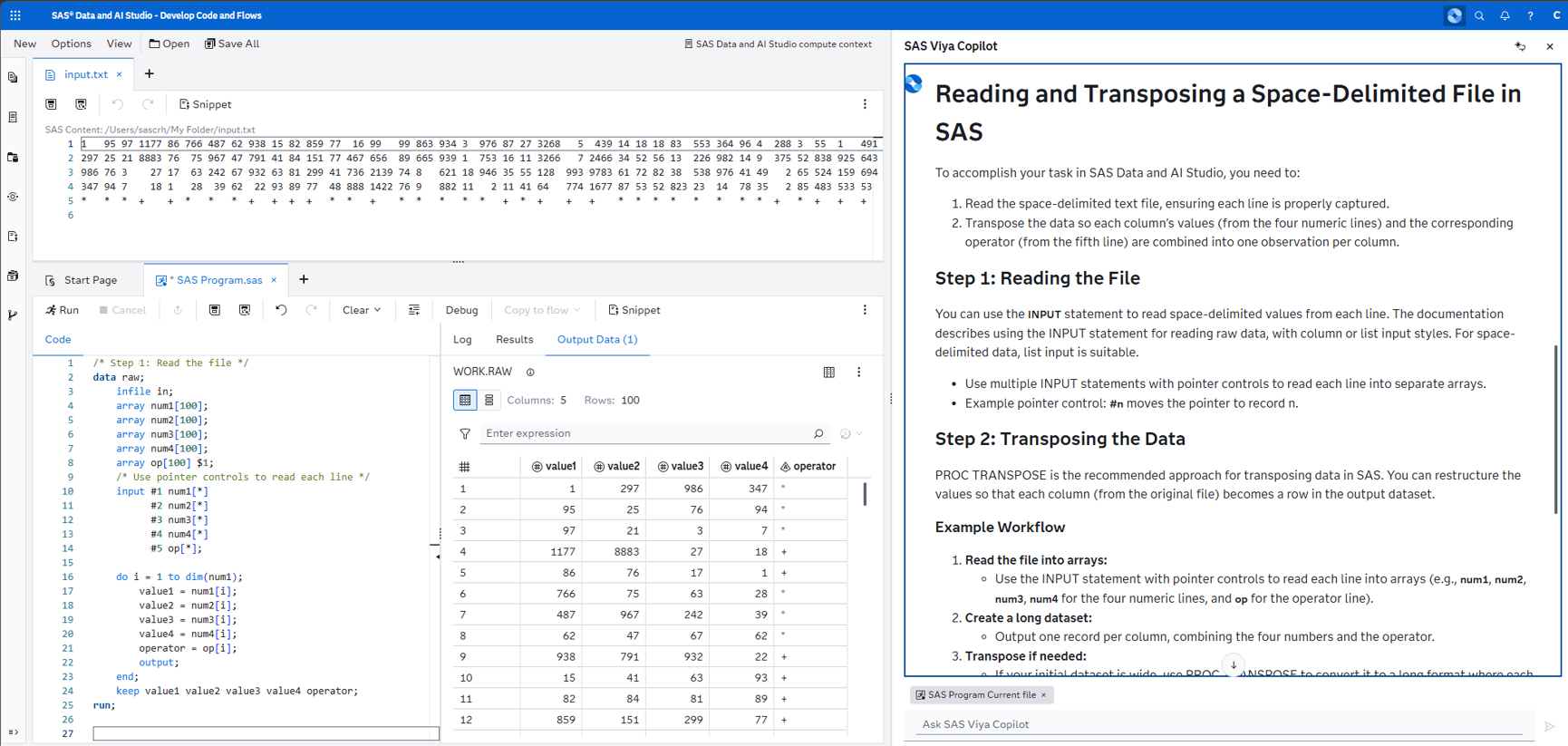
In practice, that means it can:
- Answer SAS programming questions
- Generate or improve SAS code
- Add comments and documentation
- Help interpret logs and results, including finding bugs or fixing errors!
And it's not just limited to one experience — it's part of a broader set of AI-assisted workflows within SAS.
Learn more: Check out all of the SAS Viya Copilot capabilities with these tips and tricks.
(BTW, in case you missed it, SAS Data and AI Studio is the new name for SAS Studio, the main tool for programming and low-code flows in SAS Viya.)
How I actually use AI when coding
In my experience, AI coding tools tend to fall into a few common "modes":
- Expert mode – asking "how do I...?" or requesting examples
- Partner mode – collaborating on code, adding features, or debugging
- Agent mode – handing over tasks like generating and running programs, iterating until complete
I find myself using all three, depending on the situation. Sometimes I want a quick refresher. Sometimes I want a second pair of eyes. And sometimes I want to offload the repetitive parts of building and testing code.
Is SAS Viya Copilot the only AI tool that you need? As much as I am a fan of it, I won't say that. While SAS Viya Copilot knows a lot about SAS code, it doesn't know so much about other systems you might integrate with SAS. For example, I recently used GitHub Copilot in VS Code to enhance some of my popular SharePoint-and-SAS macros. While it didn't generate perfect SAS code, this tool had access to knowledge about the Microsoft Graph API, giving me the boost I needed to accomplish the task.

Not just a productivity boost
The obvious benefit of AI copilots is productivity. They help you write code faster, automate repetitive tasks, and reduce friction when you're stuck.
But the more surprising benefit — at least for me — is what I learn. I've been writing SAS programs for a long time, and I like to think I've seen most of the common patterns. But AI assistants keep showing me:
- Functions I forgot existed
- Techniques I never learned
- Alternative approaches I wouldn't have considered
For example, as a test for SAS Viya Copilot I revisited one of my original tests for ChatGPT. Given a task to generate 100 integers between 1 and 100, the tool applied a standard approach with the RAND function but then rounded up using the CEILZ function. I was not aware of this function (a variation of the CEIL function but with zero fuzzing). It's a choice the AI tool made (and explained), and I was glad to learn about it. (And I've since learned that plenty of SAS users know about it already.)

Sometimes I'll look at AI-generated code and think, "Huh — that's actually better than how I would have done it." That's a humbling experience.
The teacher becomes the student
There's a role reversal happening here. For years, many of us in the SAS community have been the "teachers" — writing blog posts, answering questions, presenting at conferences, and sharing code. That collective knowledge is now embedded in the tools we're using.
And now, those tools are teaching us. They remind us of best practices. They surface patterns we've forgotten. They introduce us to new techniques. And they do it instantly, right when we need it. That doesn't replace expertise — it amplifies it.
A quick reality check
Of course, none of this means you can just turn off your brain and let AI write your programs. We still need to:
- Validate results
- Understand what the code is doing
- Protect sensitive data and follow responsible AI practices
Enterprise AI tools — including SAS Viya Copilot — are designed with safeguards to help with this, but the responsibility still sits with us as practitioners.
Where this is headed
If I compare where we are now to my 2023 experiments, the difference is striking. Back then, AI struggled with anything beyond simple examples. Today, it can help solve complex problems, generate working programs, and even walk through its reasoning. And the pace of improvement isn't slowing down.
I still write SAS code every day. That hasn't changed. What has changed is that I'm rarely coding alone. And increasingly, I'm learning as much from my AI copilot as it is learning from me.

4 Comments
My question is who is actually training the AI so that it learns from good code instead of bad code. (And learns to use newer SAS features instead of generating code from 30 years ago.)
For example your random number generation program does not need to use non-fuzz version of the ceiling function. It can instead tell the RAND() function to generate 'integer' instead of 'uniform' numbers.
Hi Tom, you're right! In fact, part of my test here was to see if it would pick up on that method. Obviously, there are far more examples of using RAND with 'uniform'. And in my tests, if I point out (in a prompt) that it should use the 'integer' method instead, many AI tools will accommodate. It's part of the iterative process of working with an AI assistant. I'm just grateful it didn't use RANUNI() as a method, which is very outdated but was the main random number workhorse for many decades. As the human in the loop, I can provide context in my prompt or in supporting documents to nudge the AI to use my "I will die on this hill" practices.
Thank you [and other SAS book authors] for your [AI training] service. 😊 https://www.theatlantic.com/technology/archive/2025/03/search-libgen-data-set/682094/
Thanks for the prompt (lol) to retry generating SAS code with AI — it did a much better job than last time I tried.
For your test above, ChatGPT gave me 2 examples, both nicely coded: the first was Rand Uniform, the second correctly using Rand Integer — maybe it's read this post already :]