Author

Jim Simon
RSS
Principal Technical Training Consultant

Jim Simon is a principal instructor and course developer for SAS Education. Jim has a bachelor's degree from UCLA and a master's degree from California State University at Northridge. Prior to joining the SAS Irvine office in 1988, Jim was an instructor at Ventura College and a SAS programmer at The Medstat Group in Santa Barbara. Jim's areas of specialization include the DATA step, application development, web enablement, and the SAS macro language. A native of Southern California, Jim enjoys anything in the warm California sun. On weekends, Jim loves jumping in his Corvette, turning up the stereo, and cruising Pacific Coast Highway, top down, South to Laguna Beach or North to his old home town, Santa Barbara.

Learn SAS
Jim Simon 0
Weird PROC FREQ trick

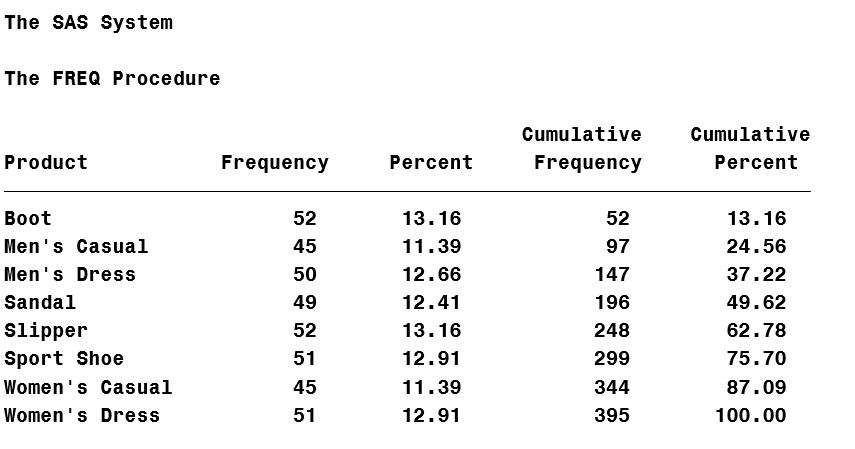
Default PROC FREQ output looks like this: Suppose you don't want the two cumulative statistic columns above.  No problem.  Those can be suppressed with the NOCUM option on the TABLE statement, like this: proc freq data=sashelp.shoes; table product / nocum; run;


Learn SAS
Jim Simon 0
Dataset too big for PROC PRINT?

Dataset too big for PROC PRINT? One weird trick solves your problem! proc print data=bigdata (obs=10); run; The OBS= dataset option specifies the last observation to process from an input dataset. In the above example, regardless of dataset size, only the first 10 observations are printed; an easy way to

1 3 4 5 6