Since its inception, DuckDB has been commanding respect in the data management sphere, carving its place as a highly performant data processing system. At SAS, the rapid advancements DuckDB has made have gone far from unnoticed; that's why, in the 2025.07 release of SAS Viya, we introduced SAS/ACCESS Interface to DuckDB. Over the last seven months, we're proud of the enhancements this has brought to the SAS suite, improving our compatibility and extensibility with open file formats like Parquet, regardless of your choice of data storage. But the job is far from done. In fact, it won't end until we've quacked our last... uh... if quack is the verb... what's the noun?.
Introducing Iceberg support
Today I'd like to share a very exciting development to the SAS/ACCESS Interface: enhanced Iceberg support! As the mountain of data organizations face continues to grow exponentially, it's no surprise that cost-efficient data storage solutions have become a major focus. This focus is two-fold: where do we store our data, for one, and equally important, how do we store our data?
Open file formats like Parquet and Avro are excellent solutions for the latter question, but depending on your choice of storage solution, you might still experience high latency, poor performance, and dangerously high storage costs. Your storage strategy, of course, is likely stratified based on data access frequency and purpose, so it's unlikely to see an organization's entire corpus of data sitting in the same solution. Nonetheless, wherever you keep your data, you'll want your storage affordable and your access efficient. DuckDB and Iceberg, used in tandem, can provide an easy, readable, and efficient methodology for accessing, querying, and even editing data while stored in cost-conscious locations. And now, as of SAS Viya's 2026.01 release, you can wield all that power yourself, from the comfort of your own LIBNAME.
Let's dig in on the what, where, and how!
Where's on First
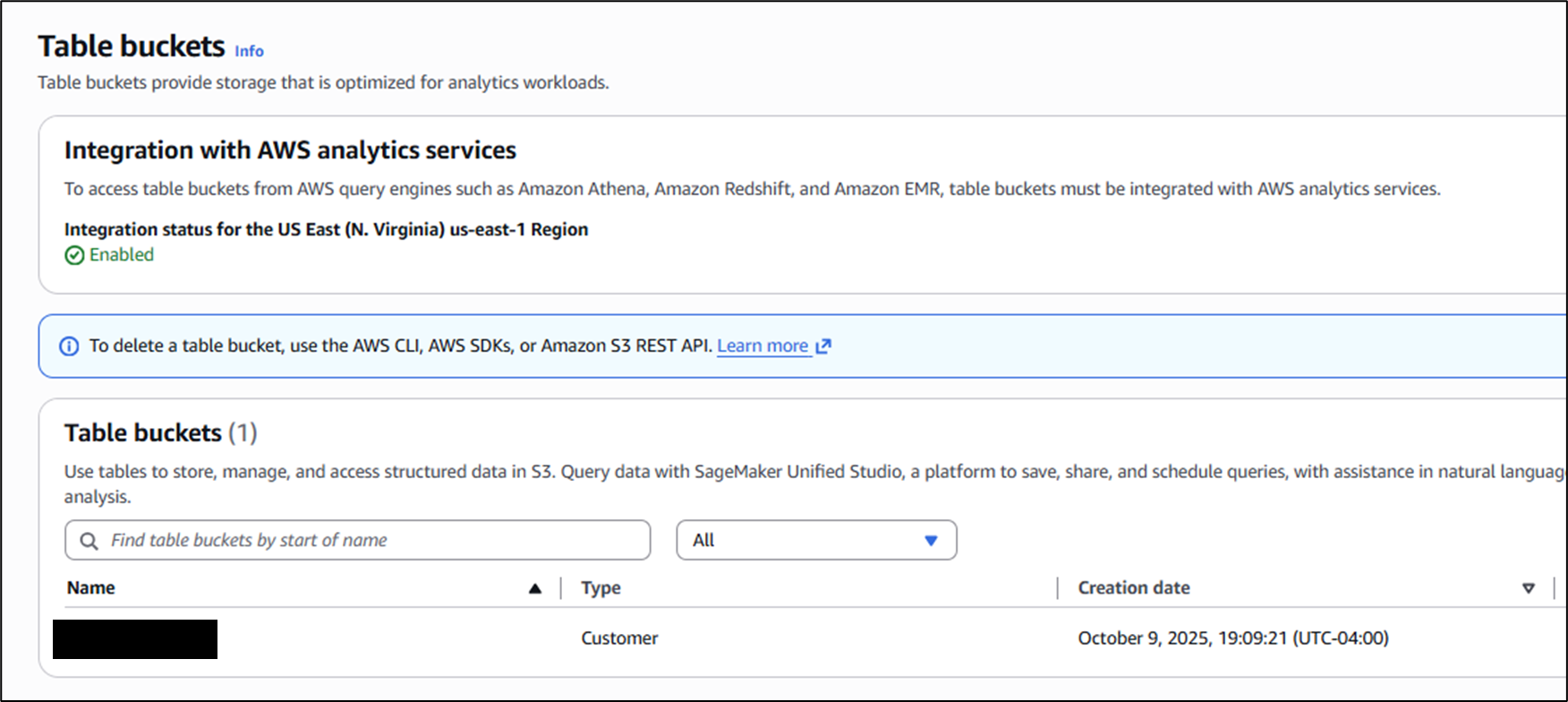
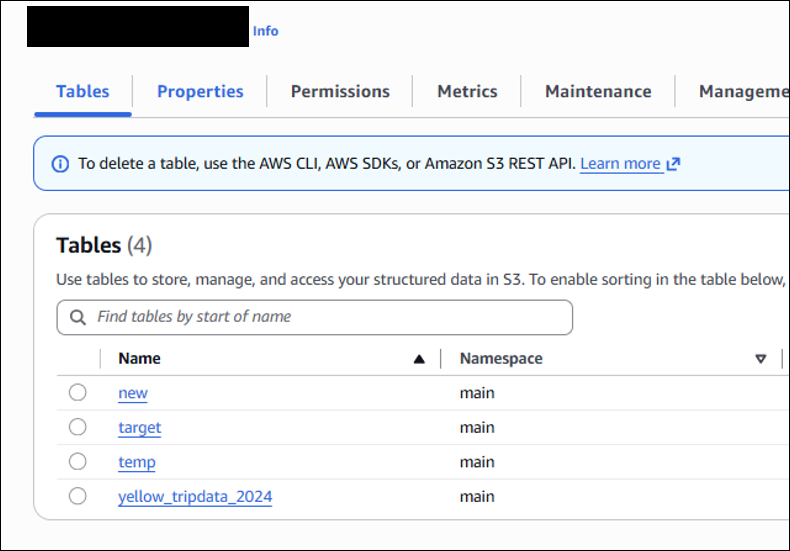
To be clear, this demonstration is surely not the only way to combine SAS, DuckDB, and Iceberg, but I've found it particularly easy, both as an administrator setting it up, and as a user leveraging it. From an admin perspective, the location we'll be keeping our data in today is AWS's S3 - but not the traditional buckets for object storage. Instead, we'll be using S3 Table Buckets, which use Apache Iceberg to manage tables as objects, rather than just files. This is supremely important when working with open file formats like Parquet, because the number one detractor from Parquet is the computational difficulty in editing it. Parquet is highly effective for querying thanks to its columnar nature and paginated metadata, but it requires full file re-writes in order to effect change. Iceberg, as a table format, mitigates this by using metadata files to manage versioning (among many other benefits) of the data they govern. As the top layer, S3 Table Buckets abstract all of these mechanisms away from the user, so all we see are query-ready tables in a conventional database structure.
How's on Second
By this point, the how is probably pretty clear: the joint operation of the SAS/ACCESS Interface to DuckDB. SAS/ACCESS Interfaces have long been used to connect to remote data sources in SAS 9 and Viya alike. But the DuckDB Interface brings a slightly different modus operandi; rather than being specifically designed to connect to a SINGLE type of data source (i.e. ACCESS to Snowflake, Databricks, etc.), the DuckDB ACCESS Interface can explicitly extend to ANY cloud storage supported by DuckDB's vast extension mechanism. This extension mechanism is exactly what we'll be leveraging behind the scenes to establish a connection to Iceberg Tables, in this case those located on S3 Table Buckets.
To connect to Iceberg tables in an S3 Table Bucket, all we need is a LIBNAME statement, just as we would connect to any other remote data source. Here, duckdb is the engine name, and bowser is the library name:
libname bowser duckdb file_type=iceberg iceberg_catalog='arn:aws:s3tables:[region]:<account-number>:bucket/[bucket-name]' iceberg_endpoint_type=s3_tables s3_access_key=&s3key s3_secret=&s3secret s3_region='[region]' schema='[schema-name]'; |
Here's what you need to make this work:
- Find the Amazon Resource Name (ARN) of your Table Bucket. This value (in quotes) will be the iceberg_catalog option.
- Declare the file_type option to be iceberg and the iceberg_endpoint_type to be s3_tables. Note that while you can write a large portion of SAS code without any regard to capitalization, the values for these options MUST be lowercase.
- Define your s3_access_key and s3_secret. For general best practice, I used macro variables that I declared elsewhere (in single quotes). These credentials should be tied to a user in your AWS account that has read & write access to the source Table Bucket.
- Define the s3_region of your bucket. It's always good practice to keep your cloud resources in the same region when possible, as cross-regional data movement introduces extra latency.
- The last thing you'll need is the schema value. When looking inside your Table Bucket from the S3 GUI, you'll notice each table has an associated namespace. This value is the schema in the full qualified table location - so any given table in the bucket could be accessed explicitly at: iceberg_catalog.<namespace>.<table>.
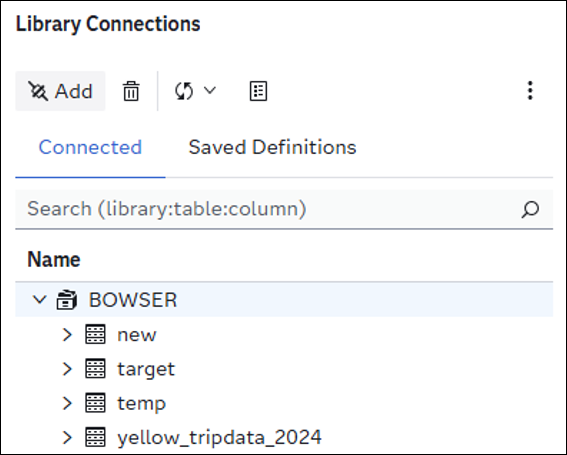
Once you have all this information, you're ready to test out your new DuckDB-powered Iceberg-backed LIBNAME! You'll notice that just like a traditional Library, your member tables are all present on the left-hand side of the GUI, as seen below. This presence is a slight distinction from some other SAS/ACCESS to DuckDB use cases, where connections to external cloud storage defined within explicit single-transaction PROC SQL / CONNECT statements would, by design, not be considered member tables. I consider the LIBNAME options as a best practice regardless of the data storage to which you’re connecting. Learn more about the options in the LIBNAME statement here.
What's on Third
What I've done to the classic Abbott & Costello skit at this point is unforgiveable, but I'm in too deep to stop now. Let's get some SAS code on the board and showcase the ease and speed that SAS/ACCESS to DuckDB to bring to your Iceberg tables. Simplest behaviors first: how do we read Iceberg tables?
PROC SQL outobs=10;
  SELECT * from BOWSER.target;
QUIT;
In the above snippet, we're simply asking DuckDB to return the top 10 rows of the target table within the BOWSER library. It looks no different than any other PROC SQL implicit read. Typically, this Bowser target would be named Mario, but in this case, it's taxi data:

When we were defining the LIBNAME, I mentioned that the S3 Tables each had fully qualified names. This is useful here, because many programmers, including myself, like to use database-specific flavors of SQL. If you're a big fan of DuckDB's SQL flavor syntax, then explicit passthrough in PROC SQL is for you:
PROC SQL; CONNECT USING BOWSER; SELECT * FROM CONNECTION TO BOWSER ( SELECT * FROM iceberg_catalog.main.target LIMIT 10 ); QUIT; |
Using the full name iceberg_catalog.main.target, we can use DuckDB-specific SQL on our S3 Table. Given the breadth of DuckDB's SQL capabilities, this serves as a powerful connection without too much of a change to the PROC SQL wrapping syntax. Note that in both the implicit and the explicit passthrough scenarios, we are required to pay attention to capitalization for the bucket-specific resources. It doesn’t matter whether the LIBNAME is capitalized, but the case of the schema and table names must match their definition in the bucket.
Thanks to advancements in DuckDB itself at the tail end of 2025, SAS/ACCESS to DuckDB can not only read from Iceberg tables, but also write!
PROC SQL;
  CREATE TABLE BOWSER.line_items AS
    SELECT * FROM WORK.line_items;
QUIT; |
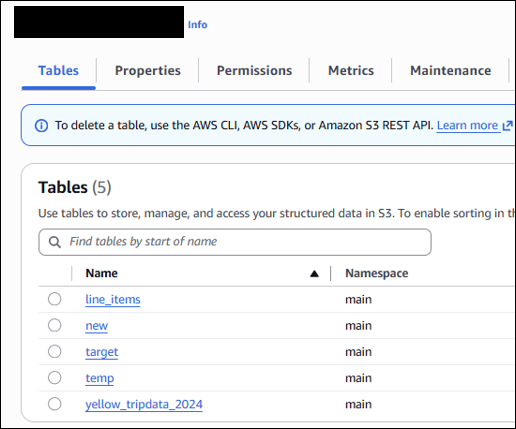
Once again, there's no deviation from the standards of PROC SQL in table creation. This exact code might be useful if we wanted to transfer a SAS table (the above being from the TPC-H datasets) into an Iceberg Table in S3 as part of our storage strategy. In our S3 Table Bucket, we can validate that the new line_items table has been created:
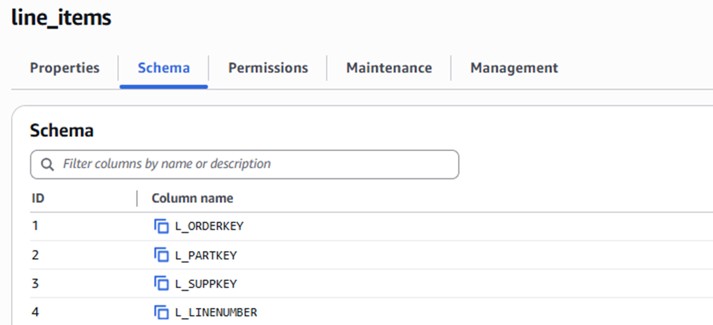
Maybe we want to perform some changes to this table down the line. If this table were stored simply as a Parquet file in a bucket, this would be a computationally expensive hassle, but thanks again to Iceberg, edits on these table objects are easy!
/* How many records do we have to start? A: 6001215 */ PROC SQL; SELECT COUNT(*) FROM BOWSER.line_items; QUIT; /* Delete all the records with ship-date before 1993 */ PROC SQL; DELETE FROM BOWSER.line_items WHERE L_SHIPDAT <= '01JAN1993'd; QUIT; /* Validation: How many records now? A: 5242432 */ PROC SQL; SELECT COUNT(*) FROM BOWSER.line_items; QUIT; |
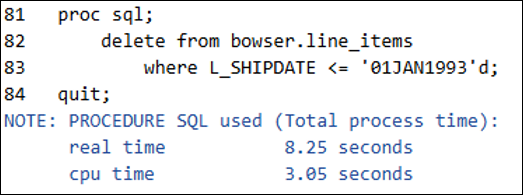
In just 8 seconds, DuckDB executed the removal of all records with a shipping date before 1993 from the table. Similarly, we can add or update records with ease. Do note the intricacies of versioning and deletions within Iceberg that allow for such efficient editing of tables backed in immutable formats. I consider it important to understand not just the fact that DuckDB and Iceberg together add value, but why they do so behind the scenes.
The one caveat before we check into the performance of SAS/ACCESS to DuckDB + Iceberg is the current limitations on the editing side. With real-world data, adding, updating, and deleting records aren't the only things that happen. Often times, we want to mutate the structure of a table itself: add, update, or remove columns. This is currently not supported in DuckDB itself, though DuckDB.org explicitly lists "schema evolution" in their near future planning. In the meantime, I highly recommend reading through the November announcement of write capabilities in DuckDB itself to learn the full extent of its capabilities.
Bringing it Home
I've harped on the value-add of DuckDB & Iceberg from the lens of SAS Viya for three bases now. Let's use a more in-depth query to validate the benefits. We'll use a widely popular (and freely available) dataset: the Yellow Taxi Trip Records courtesy of NYC.gov - specifically a single Iceberg table encompassing data from 2024, titled yellow_tripdata_2024:

The 41 million row dataset occupies 6.27GB sitting as a local .sas7bdat to the Viya environment, backed on a disk with NetApp Files Premium. For this test, we've gone ahead and pre-converted the dataset into an Iceberg table sitting in the S3 Table Bucket, where it occupies 656MB. With both versions of the dataset available, the test consists of a single implicit PROC SQL statement, seen below:
PROC SQL;
  SELECT
    passenger_count,
    payment_type,
    count(*)            AS num_trips,
    avg(trip_distance)  AS avg_distance,
    avg(fare_amount)    AS avg_fare,
    avg(tip_amount)     AS avg_tip
  FROM
    [library].yellow_tripdata_2024
  WHERE
    passenger_count is not NULL AND
    passenger_count > 0 AND
    passenger_count < 5 AND
    trip_distance < 100 AND
    trip_distance > 0
  GROUP BY
    passenger_count, payment_type
  ORDER BY
    payment_type, passenger_count;
QUIT; |
This query serves as a solid litmus test for overall engine performance, leveraging both CPU & I/O through its calculated columns, filtration, and ordering clause. We first ran it using a standard SAS Library connection to the data on the disk; then, we used the DuckDB Library to execute the query against the Iceberg table on the S3 Table Bucket. The test found a sizable improvement in both real-time and CPU-time performance by leveraging the S3 Table Bucket and querying it with the DuckDB engine:
| Engine + Storage | Real Time (s) | CPU Time (s) |
|---|---|---|
| Standard Engine + Azure NetApp Files Premium | 25.82 | 18.96 |
| DuckDB + Iceberg on S3 Tables Bucket | 3.05 | 4.60 |
| Efficiency Boost by DuckDB | 8.46x | 4.12x |
Now, while these results are exciting, I want to point out that not every query, not every table, and certainly not every use case will reap the same benefits. For example, some downstream analytical procedures in the SAS software suite that can't be mimicked with a querying engine. But there are tangible, and sometimes massive, performance improvements that SAS/ACCESS to DuckDB can introduce to your pipelines. To boot, the S3 Table Bucket that we used to back this experiment is significantly cheaper than many of the high-performance storage disks. Here's a sample calculation based on current rates and size assumptions:
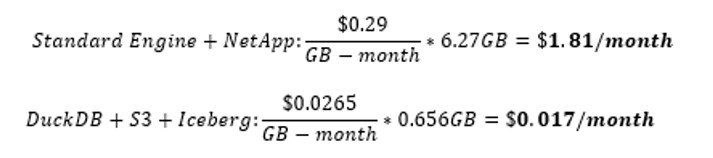
Migrating this individual workload not only noticeably improved performance, but it reduced the storage cost of the backing data by just about 99%, while also adding in the aforementioned benefits of Iceberg tables like time travel and versioning.
The last 7 months have brought incredible developments to SAS's integration with open file formats, and I'm personally thrilled to both witness and build with the resulting solutions in the SAS software suite. If you’re interested in learning more about the capabilities of SAS/ACCESS to DuckDB, I highly recommend taking the official SAS course: Working with DuckDB in SAS Viya®. It's quick, informative, and shows you a handful of tips, tricks, and best practices for maximizing the value of the engine. As always, thank you for reading, and I’ll see you at home plate.