The SAS 9.2 XML engine is very very very slick. I created an xml map to generate a dataset from xml generated during a metadata getobjects job to then run call execute statements for a proc metalib update. "Wait, you did what??!@#?&" you ask? Here are my simple steps. This
Uncategorized
We recently ran into a situation where a customer, with metadata and compute servers on Linux and mid-tier on windows, was trying to leverage the out-of-the-box Pluggable Authentication Module (PAM) support of SAS 9.1.3. PAM allows SAS customers to keep their user management simple by granting users on a Linux
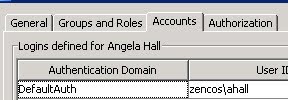
In SAS Management Console, administrators have the ability to include multiple user authentication models (ie user name/pwd combinations) for a single Metadata user account in the 'Accounts' tab. Administrators would then organize these by the Authentication Domain definition in SAS Management Console. The 'DefaultAuth' is the initial account used (unless
We recently confirmed (via http://support.sas.com/forums/forum.jspa?forumID=10&start;=0) that SAS Enterprise Guide does not support proxy servers between itself and SAS servers (metadata, workspace, stored process, etc). However, if the proxy server can be transparent then EG can work through it. While implementing SAS BI at a customer site we needed to access
SAS Enterprise Guide allows users to access files on the SAS server environment. Only one of the three options can be set - either to point to the designated user folder 'SAS User Root', set to the root 'System Root', or define a shared location/directory 'path'. The SAS Administrator sets
Using the proc metalib process to update specific elements would generate errors related to the base SAS Library conflicting with the Metalib referenced library. You can run a libname _all_ list; statement to review all the libraries available to the process. Also, the reference material utilized to improve the process
Within SAS Run the following code (the purple text is the password you would like to encode): proc pwencode in='myn3wpwd4u'; run; After submitting this code (F3), the resulting encoded password in available only in the log file. The results from this example are below, the highlighted line is the encrypted
I’ve never found a great user guide, not to say that one doesn’t exist. You should be able to schedule any type of executable/job like a batch file from using the Platform LSF client tools (packaged with the server tools). You can also use command line executables like bsub and
The data table creation date is sometimes necessary, say in the footnote of your stored process. Included below is a sample to retrieve this date from the file system. /*Open the dataset*/ %let dsid=%sysfunc(open(sashelp.shoes)); data _null_; /*grab the CRDTE function*/ ddate=%sysfunc(attrn(&dsid;,CRDTE )); /*Format in DDMONYY*/ call symput('ddate', put(ddate, dtdate9.)); run;
(Thanks Alan for passing this along!)