Chinese

資料處理時若遇到編碼/亂碼問題應如何解決?
一、可能有的狀況 錯誤訊息: [Error] Failed to transcode data from utf-16le to wlatin1 encoding because it contained characters which are not supported by your SAS session encoding. Please review your encoding= and locale= SAS system options to ensure that they can accommodate the data that you want to process. 資料匯入後都是亂碼 二、造成原因 資料與電腦環境的編碼不同,便可能造成使用者資料匯入後無法使用
EG 與 EM 介面如何修改為英文
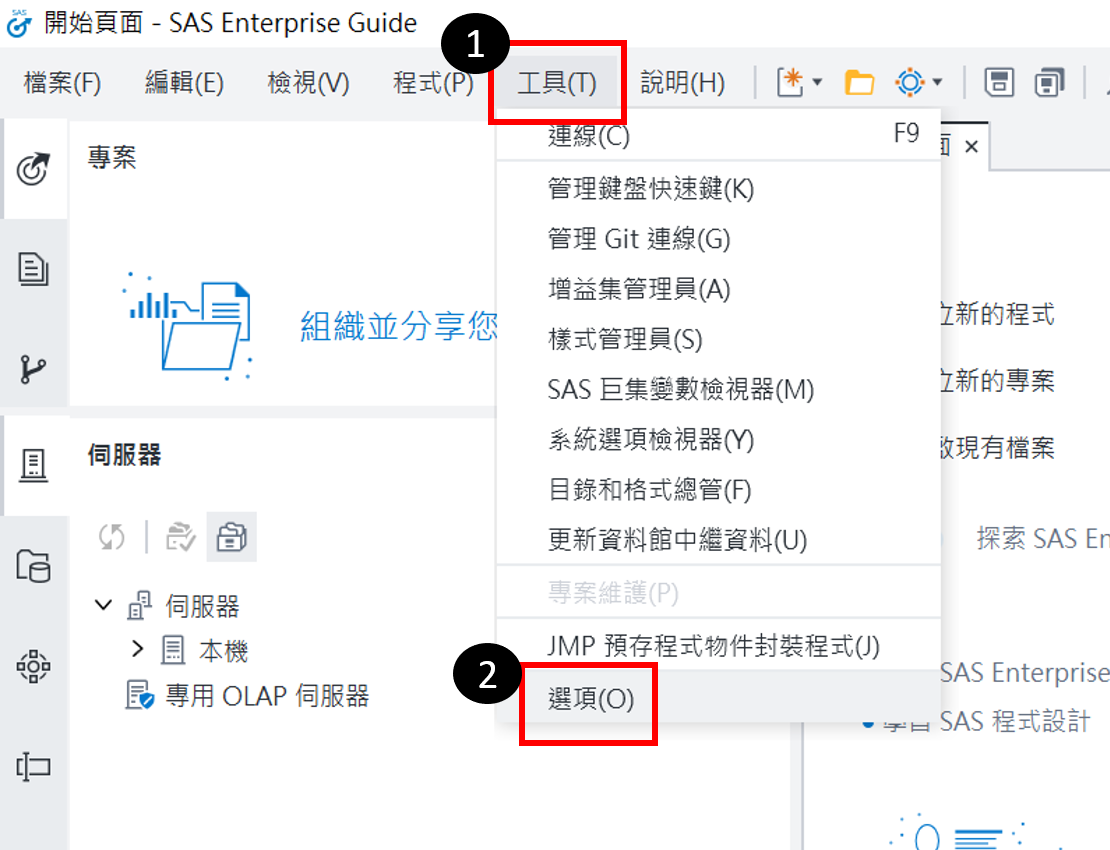
Q1. EG操作介面語言怎麼改成英文? (1). 開啟EG點選上方的「工具」>「選項」 (2). 在「啟動」頁面的「SAS Enterprise Guide 語言設定」選擇顯示語言後,按「確定」 (3).關閉 EG 後再重啟,即為修改後語言 進階閱讀: EG 輸出的報表如何轉成英文? Q2. EM操作介面語言怎麼改成英文? (1). 點選Windows下的「開始 / SAS / SAS Deployment Manager 9.4」 (2). 「選擇語言」→ 選擇繁體中文 → 確定 (3). 「SAS部屬管理程式工作」→ 選擇Locale Setup Manager → 下一步 (4). 「SAS部屬管理程式工作」→ 語言選英文(美國)[en_US], 並選取SAS Enterprise Miner Workstation Configuration → 下一步 (5).