Last week I attended a meeting of the Toronto Area SAS Society. (Okay, I didn't just attend; I was a presenter as well.) This user group meeting contained a feature that I had never seen before: "Solutions to the Posed Problem".
Weeks before the meeting, an "open problem" was posted to the TASS community group site. The problem included 134 records of time series data and an objective: create a data set that contains just the most recent record (according to the date and time values) for each unique identifier in the set.
Here's a snapshot of a data sample, with the desired output records highlighted.
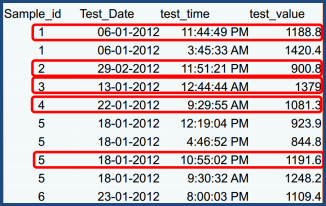
It's a simple little puzzle similar to those that SAS programmers must deal with every day. But the instructions for this particular problem were to "use an interface product" to solve it. The implication was "use SAS Enterprise Guide", but the entrants got creative with that requirement. Some used SAS Enterprise Guide to import the data (which was provided as an Excel file), but then wrote a program to do the rest. Some simply opened a program node and wrote code to do the whole shebang.
Art Tabachneck, one of the TASS leaders and a frequent SAS-L contributor, tried to use just "point-and-click" to solve the problem without resorting to a program node, but he didn't manage it. He knew that the Query Builder was the best chance for an SQL solution, and that he would need a HAVING clause to make it work. He was on the right track! But in the limited time that he had to devote to the problem, he couldn't bend the Query Builder to his will. In the end, Art wound up working within the program node, just like most other participants.
When I returned home, I made it my mission to devise a "pure" task-based solution. And here it is:
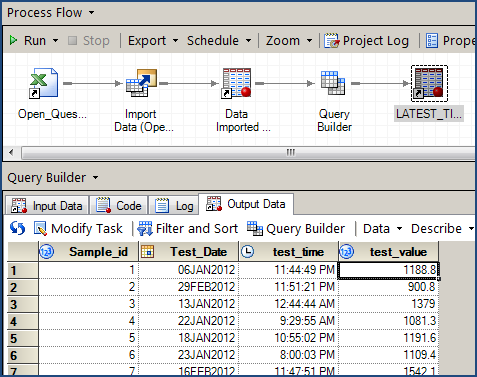
Step 1: Import the Excel file
That's easy. Even as Art observed, you simply select File->Import Data, point to the XLS file on your local machine, and then click Finish when the wizard appears. The default behavior produces a perfect SAS data set.
Step 2: Start with the query
With the output from the import step, select the Query Builder task. We need the all of the columns represented, so drag all columns over to the Select Data tab.
Step 3: Create a computed column for a combined date-time value
All of the successful solutions did this step somehow. I borrowed from the most elegant of these and created an "Advanced expression"-based column named "Test_DateTime" as:
DHMS(t1.Test_Date,0,0,t1.test_time)
Step 4: Create a MAX aggregation version of that computed column
Create another column based on Test_DateTime column, and this time apply the MAX summarization. Name the new column MAX_of_Test_DateTime.
This is the trick! As soon as you have an aggregated measure as part of the query, the Filter tab will divide into two sections, revealing a "Filter the summarized data" section. That's the piece that allows you to generate a "Having" structure.
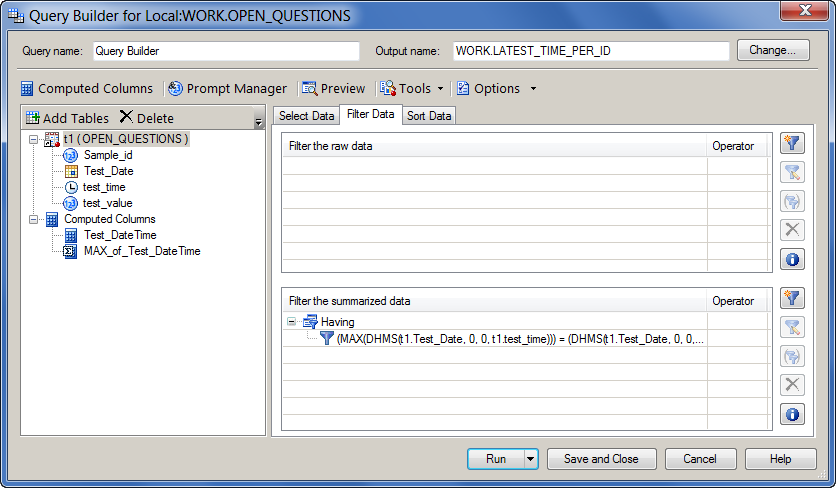
Step 5: Create a Having filter based on the summarized column
The filter is effectively:
CALCULATED MAX_of_Test_DateTime = CALCULATED Test_DateTime
The Query Builder generates more verbose SQL than the above, but you get the idea. Here's a screen shot that shows the Having filter in place.
Step 6: Change the Grouping to include just SAMPLE_ID
When you have a summarized measure in the query the Query Builder provides control over the grouping behavior. By default, the query is "grouped by" all non-summarized columns. But for this query, we want to group only by each value of the Sample_ID column. On the Select Data tab, uncheck "Automatically select groups". Then click the Edit Groups button and exclude all except for t1.Sample_ID.
Here's the Select Data tab with the proper grouping in place:
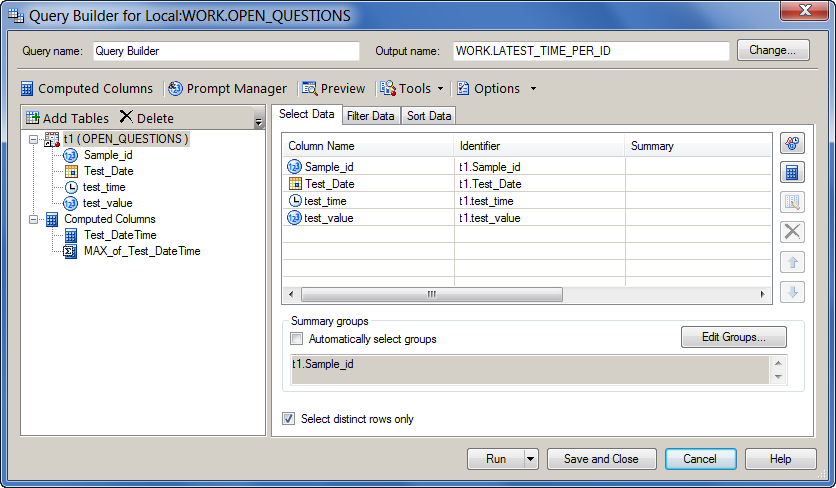
When you run the query, you should get the desired result. Here's the SQL that was generated:
PROC SQL; CREATE TABLE WORK.LATEST_TIME_PER_ID AS SELECT DISTINCT t1.Sample_id, t1.Test_Date, t1.test_time, t1.test_value FROM WORK.OPEN_QUESTIONS t1 GROUP BY t1.Sample_id HAVING (MAX(DHMS(t1.Test_Date, 0, 0, t1.test_time))) = (DHMS(t1.Test_Date, 0, 0, t1.test_time)); QUIT; |
I want to thank the members of TASS for this little puzzle. I actually learned some new things by reviewing the various solutions that were entered -- and I think that's the point of the exercise. If you're curious, here's a link to the complete "report" of submitted solutions.

18 Comments
And mission accomplished!!! Great solution.
Also thanks for sharing the TASS "Solutions to the Posed Problem" feature... something to consider for our local SAS user groups in Australia.
This is great, Chris. I'll make sure we post this on all the TASS sites we manage. Thanks again for coming up and giving your talks, they were outstanding!
Chris, very nicely done. In fact, you win the contest's grand prize: a chance to present your solution at one of our upcoming meetings! It was really great having you here and I'm sure that all of our members learned a number of things from your presentations. I know I did!
Why wouldn't you be able to use the import node, followed with a sort based on SampleID and Date and Time (both descending), followed by a no duplicates sort based soly on sample id?
Chris, that works too! It's two passes through the data instead of just one (in addition to the import step), but it produces the same output. In the Sort Data task, the option for "no duplicates" is "Keep only the first record for each 'Sort By' group" on the Options page.
The "Filter the summarized data" section of the Filter Tab is new to EGuide 5.1 - but doesn't get much attention in the "What's New" documentation.
I've often created a "pure" task-based solution even in EGuide 4.1 - but it takes three Query nodes instead of one. i.e. separate steps (nodes) for generating the MAX per ID value, then re-joining and filtering. So, it's often been easier and 'cleaner' to use a Code node and write my own SQL with a HAVING clause. However, I would often show newbies the three-step solution when helping them learn SAS.
Thanks for highlighting this very desired feature.
David, actually the "Filter the summarized data" tab (HAVING clause support) has been in place since at least EG 4.1! The requirement is that you have a summarized column and at least one GROUP column.
Chris, do you have a screen shot of the "Filter the summarized data" tab from EG 4.1 ? I don't have access to EG at the moment, but I've used it extensively and never noticed it, even though filtering on summarized values was something that wanted to do a lot.
David,
Sure, here are a few screens from EG 4.1:
Defining the query with an aggregate, and having at least one GROUP variable
Adding a filter via the "Filter on summarized data"
Generated SAS program as a result
Hi Chris,
Thanks for this, the Query Builder is a very good task, I like it a lot and often use it to write queries for me, especially when joining multiple tables at the same time!
However, I have often wondered (and been asked) why you must GROUP BY at least one column and have a summarised column in the selection in the Query Builder before you are able to specify a HAVING filter. This implies a HAVING clause requires a GROUP BY clause and to output a summarised column which is not the case in SQL. For example it is difficult to re-create the following query in the Query Builder to select the tallest person from SASHELP.CLASS:
As no GROUP BY clause is present and no summarised column is present on the SELECT clause the Query Builder does not let you specify a "Filter the Summarized Data" filter. Conversely I can easily pull out the tallest person of each (for example) sex using the Query Builder, although even then I am forced to keep MAX_of_height as a column in the output even though I might not want to output it.
The best I have managed to do so far is to create a new computed column which just contains a constant and then to GROUP BY that. This is a bit of a fudge and you have to keep the new computed column in the output too (removing it from the selected variables turns the GROUP BY clause into "GROUP BY 1" which is grouping by the first selected column rather than the constant "1". So the underlying SQL generated by the query builder is:
Is there a particular reason why the Query Builder requires a GROUP BY clause and a summarised column on the SELECT clause before a HAVING clause can be added?
Cheers,
Mark
Hi Mark,
SQL is very powerful -- as you know -- and the query builder does not support every permutation of a query, although it does aim to support the most common operations that even advanced users might need.
There is a way to achieve your result by DROPping the columns that you don't want, but not within the SQL. Instead, you can go to the "Options for this query" window (click Options toolbar in the query window) and add:
The code that results:
You can also use the new subquery feature within EG 5.1 to achieve a similar result, and it might be more useful. You design the inner query first (calculating the MAX of Height), then save as a template. You can use that template as a filter in a different query. Here's the resulting code:
Hi Chris. Thanks for getting back to me on this. The sub-query approach is a nice one for EG 5.1+ users. I think I'll still be heading over to the SAS Ballot to request those little tweaks to the Query Builder though :o)
Cheers,
Mark
Thanks Chris - very elegant. I'd have used a similar approach, but would have created a dataset of maximum date/times and joined it to the source data
Bob, there are twenty ways to do everything in SAS. That's what makes it fun (and sometimes a bit challenging)! If you look at some of the submitted solutions, they use DATA step and the hash object. To me, that's overkill. But some folks use hash as their "hammer" to fix all problems :)
I've used the approach a few times. In general, both in teaching and working with fellow SAS programmers, by they time they understand enough SQL to use the HAVING clause, they also prefer to "hand code" those sorts of queries.
Pingback: Building an SQL subquery in SAS Enterprise Guide - The SAS Dummy
Thanks for the post, you solved my problem. We are supossed to program the less possible in the office (so other non-programmers could "understand" :O) so I needed to solve this with the Enterprise Guide's wizards...
And finally I got it working!
Great work. Thanks again.
Have a nice day.
Excellent -- I'm glad this helped!