Most custom tasks need to access SAS data in some way. Since custom tasks are built using Microsoft .NET, and the .NET Framework is object-oriented, it would be convenient if we had an object-oriented method for navigating SAS data sources.
That was the thinking behind the "SasData"-namespace classes within the SAS Tasks Toolkit. The SAS Tasks Toolkit is a library of .NET classes (included in SAS.Tasks.Toolit.dll) that simplify the implementation of custom tasks by handling most of the "plumbing" for you, so that you can concentrate on the purpose and content of your task. (The SAS Tasks Toolkit is discussed in greater detail in my forthcoming book, Creating Custom Tasks for SAS Enterprise Guide using Microsoft .NET.)
These classes in the toolkit can help with navigating and inspecting the properties of data-related objects in SAS:
- SAS.Tasks.Toolkit.SasServer (object for SAS workspace)
- SAS.Tasks.Toolkit.SasData.SasLibrary (object for SAS data library)
- SAS.Tasks.Toolkit.SasData.SasData (object for SAS data set or view)
- SAS.Tasks.Toolkit.SasData.SasColumn (object for a variable in a data set)
- SAS.Tasks.Toolkit.Helpers.TaskDataHelpers (methods for retrieving data values)
I built a simple example so that you can see this in action. Here's a preview of the user interface:
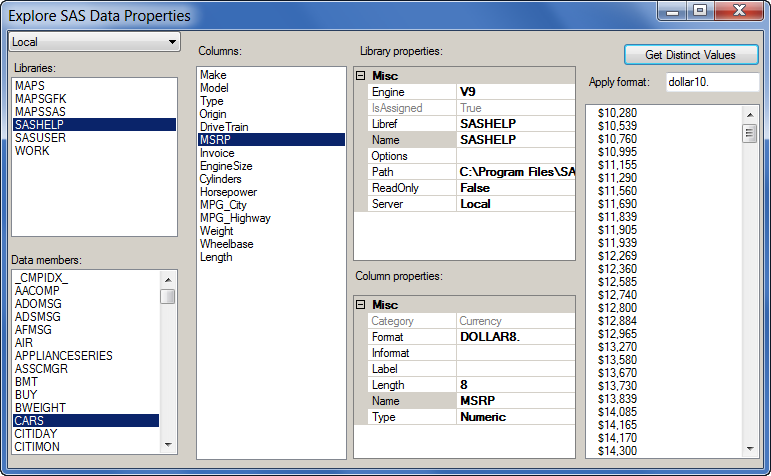
You can get the source code for this example on my SasDataExample github repository. There is a ready-to-use DLL that you can "install" into your SAS Enterprise Guide 4.3 or 5.1 to see it in action. And if you want to dabble with the C# source, you can use Microsoft Visual C# Express or Visual Studio (2010 or 2012 editions).
(Note: you don't have to be a github user to try the example. You can download the ZIP archive with a single click.)
What's remarkable about this example is that it contains very little code. Aside from the "designer" code in the Windows form, there are really only about 100 lines of code in the "form" class (excepting comments and spaces).
As I described in a previous post, I'm using data binding to populate the UI controls with the content of the SAS data object.
For example, once you select a SAS server (using the drop-down list in the upper left corner), these few lines of code will populate the list of SAS libraries:
// use the SasServer.GetSasLibraries method
// to get a collection of defined SAS libraries
// on the active server
SasServer s = cmbServer.SelectedItem as SasServer;
IList<SasLibrary> libs = s.GetSasLibraries();
lbLibraries.Items.Clear();
lbLibraries.Items.AddRange(new List<SasLibrary>(libs).ToArray());
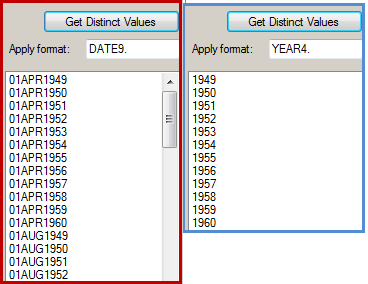
This example illustrates a cool function within the SAS.Tasks.Toolkit.Helpers.TaskDataHelpers namespace: GetDistinctValues. You supply it a data reference and the name of a column, and it returns a list of the distinct values within the data for that column. So it's like a SELECT DISTINCT operation, but it's got one additional cool feature: you can optionally supply a SAS format to apply.
So if you have a SAS date column with daily measures (for example) and you want a list of just the distinct year values in the data, you can simply apply the YEAR4. format in the GetDistinctValues function. The following screen image from the example task shows what kind of difference that can make:
If you have questions or thoughts about the example, its code, or the idea of placing such examples on github, please post back in the comments.

14 Comments
Great stuff Chris. Thanks for taking the time to do this plumbing for us.
Hi Chris,
Is it possible to build a custom task by modifying the existing query builder task?
If yes could you please give me some tips and steps to follow to build the new custom task.
Regards
Ramana
Ramana, no, you cannot modify an existing task to create your own custom task. But you can reuse some pieces of the task framework, such as the *simple* filter selection, in your own tasks. An example is described in Chapter 11 of my book, with the source project available here.
Excellent, Chris!
Keep up the good work!
Kirk
Thanks again, Chris! Another question, is there a method that I can use to get the data's size?
That information is in SASHELP.VTABLE. The SasData classes don't provide a direct method to read it, but you can use the SAS OLE DB provider and a simple query to access the relevant fields. Check out my Data Set->DATA Step example for code samples that use the OLE DB provider.
Yeah, I notice that too. So I use the OleDbDataAdapter to get the data into a DataSet, then use the Select method get the specified information. Just like this:
System.Data.OleDb.OleDbDataAdapter obAdapter =
  new System.Data.OleDb.OleDbDataAdapter(
     "select memname,nobs,filesize from sashelp.vtable where libname=\"DATA\"",
     "provider=sas.iomprovider.1; SAS Workspace ID=" +
     remote_server.GetWorkspaceIdentifier());

DataSet obDS = new DataSet();
obAdapter.Fill(obDS, "Infor");

String query = "memname='" + data_name + "'";
/*Get the Data Obs*/
String temp = obDS.Tables["Infor"].Select(query)[0][1].ToString();
........
But I have a little question about the "provider=sas.iomprovider.1". The number 1 will change or not?
Slash, that "prog ID" with the "1" has been like that for many years, and works even with the latest versions. I think it's safe to use. I think you could leave the ".1" off and it would still work, as there is an entry in the registry for it.
Hi,
I have a query.Can I get the version of SAS(9.1,9.3,9.4) to which I am connecting using SAS enterprise guide.
I want this version using .NEt dll SAS.Tasks.Toolit.dll).
Yes: You can use the GetSasMacroValue method on the SasServer class. Example:
SasServer s = new SasServer("SASApp");
string ver = s.GetSasMacroValue("SYSVER");
This will work with SAS 9.2 and later, as the SAS.Tasks.Toolkit is supported in EG 4.2 and later. So SAS 9.2 is a minimum requirement.
Thanks Chris !!! one more thing Can I get the version of SAS Enterprise Guide(like 4.3 , 7.1) also using this dll.
I am having both EG 4.3 and 7.1 versions on my system and I am integrating my .NET window app in both the versions.
I have a requirement to get the version of EG thru .NET code.
Yes -- actually an easy to accomplish this is to check the version number of the SAS.Tasks.Toolkit.dll file. You can do this with:
System.Reflection.Assembly.GetAssemblyType(SAS.Tasks.Toolkit.SasServer).FullName
The returned value should contain the full name of the Toolkit assembly, including the version information.
Thanks Chris ! But It will always return 4.3 since I am using same .dll for EG 4.3 and EG 7.1.
What I want is, it should return 7.1 when I am integrating my .NET app with EG 7.1 and should return 4.3 when I am integrating my .NET app with EG 4.3.
When you're running with EG 7.1, the 7.1 version of the Toolkit DLL will be loaded. So that's the version that will be returned. (DO NOT deploy the SAS.Tasks.Toolkit.dll with your custom task -- it should always be using the version that ships with the version of EG that's running, even if you built the task by referencing the 4.3 version.)