As I mentioned in my introductory post about Windows PowerShell, you can use PowerShell commands as a simple and concise method to collect data from your Windows systems -- information that is ripe for analysis within SAS.
In this example, I'll show a technique for using a SAS program to call PowerShell and funnel the results directly into your SAS session for analysis. This example uses the Get-Process cmdlet (pronounced /command-let/) to collect information about running processes on a given Windows machine.
I built this example in pieces, making sure that each part worked before putting it all together:
- I ran the powershell command from a command prompt console, and redirected the output to a text file. For example:
powershell -Command "Get-Process -ComputerName L73391"
  > c:\temp\outProcesses.txt
- I worked with the text file in SAS and SAS Enterprise Guide to develop a DATA step that could read/interpret it
- I combined the command and DATA step into a program using FILENAME PIPE syntax
- I tested the program on different machines, just to make sure that the behavior of the command and the text file didn't change across machines.
In order to run this example, you need the following conditions to be true:
- You should enable PowerShell scripts to run, as I described in my previous post.
- Your SAS session must be running on Windows, on a machine where PowerShell is available. Most modern Windows machines will have PowerShell already. But if you are running Windows XP or Windows Server 2003, you might need to download and install Windows PowerShell.
- Your SAS session needs access to the FILENAME PIPE feature. This is linked to the ability to run system commands. If you're running the program through SAS Enterprise Guide, you'll need to check that proper XCMD options are enabled.
/* name of a machine on my network where I have admin rights */ %let machine = L73391; filename process pipe "powershell -Command ""Get-Process -ComputerName &machine."""; data processes; infile process firstobs=4; length Handles 8 WorkingSet 8 CPU 8 ID $ 8 ProcessName $ 255; format WorkingSet comma12. Handles comma6.; input @1 Handles @25 WorkingSet @42 CPU 42-50 @51 ID @59 ProcessName; run; title "Processes on &machine"; /* with an ODS destination active, this will create a report */ proc sql; select * from processes order by WorkingSet desc; quit; proc means data=processes; var Handles WorkingSet; run; |
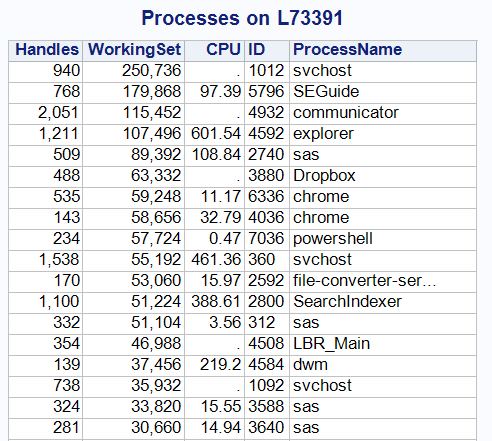
This produces a simple report of the active processes on the given machine. Here is a partial example of the output, in descending order of "Working Set" (which is one measurement of the amount of system memory in use by a process).

25 Comments
Pingback: Traffic report: the most visited posts of 2011 - The SAS Dummy
hi Chris, this code works fine, on my system too in SAS display manager.
however, if I put the powershell command in a file and call it with the PowerShell -file parameter, like:
filename process pipe "powershell -File""c:\users\sas\process.ps1""";
I get:
File C:\users\sas\testport.ps1 cannot be loaded because the execution of script
s is disabled on this system. Please see "get-help about_signing" for more deta
ils.
At line:1 char:26
+ c:\users\sas\testport.ps1 <<<<
+ CategoryInfo : NotSpecified: (:) [], PSSecurityException
+ FullyQualifiedErrorId : RuntimeException
Strange because when I execute:
powershell -File""c:\users\sas\process.ps1"
from a Windows command prompt running as that same user, the script executes without warnings.
do you have an idea why this is and how to fix it?
Bart,
You might try to "open up" the PowerShell policy even more. Try (from a PowerShell window):
You'll have to confirm that command with a Y/N prompt, take an oath to do no harm, and prove that you don't have a criminal record. But after all of that, hopefully PowerShell will allow you to run any script under any circumstances.
hi Chris, I had already tried that, it made no difference.
does the command shell spawned by sas run in some sort of protected environment perhaps?
Bart,
What if you add this to your PowerShell command?
as in:
Disclaimer: I haven't tried that, but just came up with this via some research.
you're pretty good Chris, that worked!
thanks, Bart
"pretty good" - that is high praise from the Dutch. I'll take it.
Hi Chris
Thank you for your post. I can't get the following code to work in SAS DI. I have written the code in a user written transformation. The transformation runs successfully but doesn't do anything (extract the files from ZIP):
filename unzip pipe
"powershell -command ""$shell = new-object -com shell.application
$zip = $shell.NameSpace(“C:\ZipFilepath\ZipFile.zip”)
foreach($item in $zip.items())
{
$shell.Namespace(“C:\ZipFileContentsPath\INPUTS”).copyhere($item)
}""";
I get the following note in the log:
NOTE: The quoted string currently being processsed has become more than 262 characters long. You might have unbalanced quotation
marks.
I'm not sure which quoted string the message is referring to. I have tried removing quotes from before $shell and at the end but end up with the same result.
Can you please advise?
Thank you.
I noticed that your command uses angled open/close double quotes instead of the straight quotes -- I don't know if PowerShell processes those properly. The official "escape" character in PowerShell is the backtick, or ` (appears to the left of the "1" key on my US keyboard). You can use that to escape quotes within the PowerShell statement.
To avoid the WARNING, submit OPTIONS NOQUOTELENMAX; before the command. I'd submit OPTIONS QUOTELENMAX; again after the command.
Also, did you know that you can use SAS to read/extract data from ZIP files directly? Take a look at the FILENAME ZIP method.
Hello Chris
Thank you for responding.
I'm trying to make sense of which quotes within the command I need to change it would really help if you could edit the above code with changes you have suggested please?
Thank you.
I placed an annotated screenshot of what I see in your code, here. I recommend trying to build out this command piecemeal and then assembling as a single string -- it might make it easier to keep track of the quoting.
I've made the suggested changes to my command -- so replaced double quotes (as pointed out in the annotated screenshot) with the "backtick". I've also added OPTIONS NOQUOTELENMAX; before the command and OPTIONS QUOTELENMAX; again after the command. This does indeed get rid of the warning message I was encountering.
However my command is still not unzipping the file out of the zip folder even though the command has ran successfully without any warnings or errors.
I have tried the method outlined in http://blogs.sas.com/content/sasdummy/2015/05/11/using-filename-zip-to-unzip-and-read-data-files-in-sas/ but this method doesn't physically unzip files out of the zip folder but reads the data out of the zipped file and outputs it into a new file.
What if -- instead of embedding the entire command in a filename pipe -- you placed the command in an external file (like a PS1 or BAT or CMD) and then issued a command from SAS to run that?
Might not be the ultimate solution, but I usually try to build up a command in pieces that work as I assemble the complete solution.
Hi Chris,
I am a SAS PC user and wanted to know if there is a way to get an error code returned to SAS if a Power shell script fails to run. I have write the following script and am using the code below to invoke it.
DATA _NULL_;
X powershell -file "&drive\source\&liblvl\Support\a789337\WinObject\Excel2Format.ps1" "&drive\data\&liblvl\&project&subphase\miscell\Output_Queue\&subfile.&sysdate._Individual_Members_Not_Mapped.xls";
Run;
param([string]$xlpath)
Write-Host $xlpath
$Excel = New-Object -ComObject Excel.Application
$t = '[DllImport("user32.dll")] public static extern bool ShowWindow(int handle, int state);'
add-type -name win -member $t -namespace native
[native.win]::ShowWindow(([System.Diagnostics.Process]::GetCurrentProcess() | Get-Process).MainWindowHandle, 0)
$Excel.Visible = $False
$Excel.DisplayAlerts = $false
$WorkBook = $Excel.Workbooks.Open($xlpath)
$WorkSheets = $WorkBook.WorkSheets
$WSCount=$WorkSheets.Count
For($i=1; $i -le $WSCount; $i++)
{
$WS=$Worksheets.Item($i)
$WS.Activate()
$WS.application.activewindow.splitrow = 1
$WS.application.activewindow.freezepanes = $true
$range4=$WS.range("1:1")
$range4.font.bold=$true
$range4.AutoFilter() | Out-Null
$WS.Columns.AutoFit()
$WS.columns.Item(1).EntireColumn.Columnwidth=$ColAWidth
}
$WS=$Worksheets.Item(1)
$WS.Select()
$WS.Activate()
#save
$excel.DisplayAlerts = $False
$WorkBook.SaveAs($xlpath)
Start-Sleep -s 5
$excel.Visible=$False
$WorkBook.Close()
#exit
$excel.Quit()
$Excel, $WorkBook, $WorkSheets | ForEach{
[void][Runtime.Interopservices.Marshal]::ReleaseComObject($_)
}
Thanks for your help.
If you can change your code to use CALL SYSTEM or SYSTASK, you can more easily retrieve a return code from the program that you call. Exactly what's in that RC will depend on Powershell and the logic that you include. As there are a number of things that could fail in the script that you shared, there are lots of opportunities to catch/enumerate various error conditions.
Hello Chris,
I am trying to call a Powershell set of commands that work at the powershell prompt but cannot seem to get them to work as a script. I am not sure where my problem lies, ultimetly I want to call the script or script commands from SAS. The process goes out and finds all business object reports (*.rep) on a network file share I have access to. It makes a very nice CSV file that I read in already in my SAS program and can manipulate the data there perfectly. I just have to call the peaces individually at this point and I was trying to get it all in one SAS program. I use SAS PC if that makes a diferance.
My SAS test code based on your above examples:
%macro fdate(fmt);
%global tdatetime;
data _null_;
call symput("tdatetime",left(put(DATETIME(),&fmt)));
run;
%mend fdate;
%fdate(datetime22.2);
%let test="go &tdatetime.";
%put &test.;
filename process pipe "powershell -noprofile -executionpolicy bypass -File""Z:\My_path1\My_path2\File_Extension_Search_for_rep_Script_PowerShell_with_last_modified.psl""";
%fdate(datetime22.2)
%let test="stop &tdatetime.";
%put &test.;
My logs if this might help in trouble shooting:
161 %macro fdate(fmt);
162 %global tdatetime;
163 data _null_;
164 call symput("tdatetime",left(put(DATETIME(),&fmt)));
165 run;
166 %mend fdate;
167 %fdate(datetime22.2);
NOTE: DATA statement used (Total process time):
real time 0.00 seconds
cpu time 0.00 seconds
168 %let test="go &tdatetime.";
169 %put &test.;
"go 11MAY2018:09:05:55.10 "
170 filename process pipe "powershell -noprofile -executionpolicy bypass
170! -File""Z:\My_path1\My_path2\File_Extension_Search_for_rep_Script_PowerShell_with_last_m
170! odified.psl""";
171 %fdate(datetime22.2)
NOTE: DATA statement used (Total process time):
real time 0.00 seconds
cpu time 0.00 seconds
172 %let test="stop &tdatetime.";
173 %put &test.;
"stop 11MAY2018:09:05:55.11 "
my PowerShell code:
$time = (Get-Date).ToString("yyyy.MM.dd")
$Search = "Y:\"
$Outfile = "\\My_server.My_domain\My_share1\My_path1\My_path2\GA_report_$time.csv"
$Files = Dir $Search -recurse -include *.rep -EA SilentlyContinue |
select-object Length,name,Fullname,extension,LastWriteTime | sort-Object extension
$Files | Export-Csv $Outfile -NoTypeInformation
$Files | Group extension -NoElement | % {$Ext = $_.Name;$_ | Select @{N="Extension";E={$_.Name}},Count,`
@{N="SizeMB";E={"{0:N2}" -f (($Files | ?{$_.extension -eq $Ext} | Measure Length -Sum).Sum /1MB)}}} |
ConvertTo-Csv -NoTypeInformation | Out-File $Outfile -Append -Encoding ASCII
$Search = "Z:\"
$Outfile = "\\My_server.My_domain\My_share1\My_path1\My_path2\IR_report_$time.csv"
$Files = Dir $Search -recurse -include *.rep -EA SilentlyContinue |
select-object Length,name,Fullname,extension,LastWriteTime | sort-Object extension
$Files | Export-Csv $Outfile -NoTypeInformation
$Files | Group extension -NoElement | % {$Ext = $_.Name;$_ | Select @{N="Extension";E={$_.Name}},Count,`
@{N="SizeMB";E={"{0:N2}" -f (($Files | ?{$_.extension -eq $Ext} | Measure Length -Sum).Sum /1MB)}}} |
ConvertTo-Csv -NoTypeInformation | Out-File $Outfile -Append -Encoding ASCII
Again my long term goal is to get the results of the PowerShell process into SAS for analisys all in one SAS program (of course calls to PowerSell okay).
Thanks for any advise you might be able to provide. I hope this is an easy one to spot, I know its a bit verbos on the code and question side sorry. -Keith
Quick question -- did you try my example as-is, and did it work for you? And did you enable PS scripting?
I did the one that read the PC task manager info just fine, I am not sure what you mean by PS scripting. let me re-read the threat in case I skipped somthig... -KJ
I can both scripts to work at the PowerShell prompt level but in SAS they both fail with shown rights in SAS. (see both versions)
filename process pipe "powershell Set-ExecutionPolicy –Scope CurrentUser Unrestricted -File""Z:\File_System_Search\Rep-
Search\File_Extension_Search_for_rep_Script_PowerShell_with_last_modified.ps1""";
filename process pipe "powershell -noprofile -executionpolicy bypass -File""Z:\File_System_Search\Rep-Search\File_Extension_Search_for_rep_Script_PowerShell_with_last_modified.ps1""";
CurrentUser Unrestricted seems like a higher level of access but and give no error log reason why.
-perplexed 8]
A combination of the execution policy and the mapped drive (network location) of the script might be a factor, as PowerShell might want some elevated levels of trust for this. If you can, you might try to remove SAS from the equation and try running the script from another process (like VBS or a batch file) and see what it takes to make it work. The Set_Execution-Policy Bypass would need to be run as an Admin and apply to the Machine level (I think) to affect future invocations like this.
Chris,
PS I was wondering if you had ever ran powershell on a Win10 system and network shared drives? I can get your code starting with:
%let machine = L73391;
filename process pipe
"powershell -Command ""Get-Process -ComputerName &machine.""";
data processes;
[...]
run;
to work just fine now. So I know it's not powershell+SAS in genaral. I now can get my powershell script to work from windows explorer, but it askes if I want to run this powershell script yes or no, and am not sure if I am using the "-noprofile -executionpolicy bypass" correctly or if it works with Windows 10 systems and netowork shares in this case? Thanks again -Keith
Is there a way to save a word docx as a text file in sas like in this example:
https://devblogs.microsoft.com/scripting/how-can-i-save-word-documents-as-text-files-by-using-a-script/
You could use SAS to call PowerShell to automate Word to convert the document to Text. That's a lot of moving parts, I know. Another approach: as docx files are just ZIP files, you could use the FILENAME ZIP method to extract the text portion from the internal 'word/document.xml' member.
Hi Chris,
Would mind sharing how to get powershell process' result as string (macro variable). I use the follow code just can get the exit code, but I'd like to string (from powershell) as macro variable.
Thanks
data null;
rc =system('powershell viyacli-comads.ps1 &viya_user. &_viya_passwd. ; exit $LASTEXITCODE');
put rc;
if rc ^=0 then do;
%CHECK_ERROR_ABEND(rc, %str(error message as ...));
end;
BTW: viyacli-comads.ps1 is a powershell file use viya cli to get model's infomation.
SHunrui
You can't share a macro variable that's set in one SAS session with another SAS session (that called it via SYSTEM), but maybe you can set an environment variable in the one script and read it from the SAS program with SYSGET?