Recently, a colleague struggled to find the source of a run-time error happening somewhere within a very large library of SAS IML function modules. Since the error happens at run time, I told my colleague about how to find the location of a run time error by reading the traceback messages in the SAS log. The log identifies the call stack at the time of the error. The call stack is the sequence of module calls that lead to the error. For example, perhaps the error happens in module 'ONE', which was called by module 'TWO', which was called by module 'THREE', and so forth.
I empathize with my colleague's frustrations. It can be hard to debug a long program that has many levels of nested function calls. The best prevention is a comprehensive set of test programs for the low-level routines. However, in spite of our best development and testing efforts, sometimes we must debug a program. This article presents an IML function and a SAS macro that I sometimes use during the development and debugging of large IML programs. The first uses the built-in MODULESTACK function to print the location of module and the call stack. The second uses the "old-school method" of printing local variables to investigate their values as the program runs.
The MODULESTACK function
The MODULESTACK function can be a life-saver for debugging. It returns a character vector that contains the call stack: the name of the current module and the chain of modules that resulted in the current call. That is, if s = ModuleStack(), then s[1] is the name of the current module, s[2] is the name of the parent module, and so forth. By using the MODULESTACK function, you can print that information at any time during the execution of any module. You don't have to wait for a run-time error to find that information in the log.
Let's run an example that shows how the MODULESTACK function works. The following two modules are taken from a previous article about how to find the location of a run-time error. I have inserted a call to the MODULESTACK function into each function, and the functions now print the call stack:
proc iml; /* example from https://blogs.sas.com/content/iml/2025/03/17/traceback-error-sas.html */ start mod1(x); stack = ModuleStack(); print "In the " (stack[1]) " module. The full stack is ", stack; y=1; w=mod2(x); /* call MOD2 from MOD1 */ sum = x + y + w; return sum; finish; /* this function produces as ERROR if x <= 0 */ start mod2(x); stack = ModuleStack(); print "In the " (stack[1]) " module. The full stack is ", stack; a=1; b=2; c=log(x); d=4; return a+b+c+d; finish; q = mod1(1); |
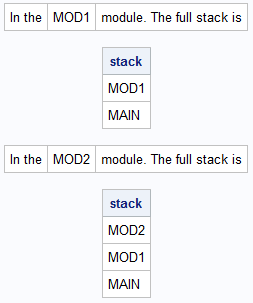
The output shows the logical flow of the program when you call the MOD1 function:
- The program enters the MOD1 module, which prints "In the MOD1 module." It also prints the call stack, which reveals that MOD1 was called from the main program.
- Inside the MOD1 function is a call to the MOD2 function. If the program runs without error, it enters the MOD2 function, which prints "In the MOD2 function." It also prints the call stack: MOD2 was called by MOD1, which was called from the main program.
Use the MODULESTACK function to debug a program
After you understand how the MODULESTACK function works, you can create a small helper function. By default, the following function prints the name of the current module. You can pass in 0 as an argument to print the full call stack.
/* Debugging function to unconditionally print the name of the module that calls the PrintLoc function. Syntax: run PrintLoc(); * prints the module name ; run PrintLoc(0); * prints the full module call stack ; run PrintLoc(2:3); * prints the module and the calling module ; */ start PrintLoc(level=2); /* default is level=2 b/c stack[1] = "PrintLoc" */ stack = ModuleStack(); if level=0 then levels = 2:nrow(stack); else levels = level; location = stack[levels]; print location[L="Module"]; finish; |
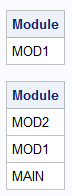
With this new PrintLoc module, let's revise the definitions of the MOD1 and MOD2 functions. For MOD1, I want to print the name of the module. However, I suspect that the source of my bug is in MOD2, so in that module I will call PrintLoc(0) to print the full call stack. Finally, I will call MOD1:
start mod1(x); run PrintLoc(); y=1; w=mod2(x); /* call MOD2 from MOD1 */ sum = x + y + w; return sum; finish; /* this function produces as ERROR if x <= 0 */ start mod2(x); run PrintLoc(0); a=1; b=2; c=log(x); d=4; return a+b+c+d; finish; z = mod1(1); |
The program generates the following output. This output can help you to understand the flow of the program.
Print the value of variables if a condition is true
One of the simplest (and oldest!) techniques for debugging run-time errors is to strategically insert PRINT statements into a program. To avoid massive amounts of output, these are often conditional PRINT statements. That is, printing happens only when a certain condition is true. For example, in the previous section, you could add a PRINT statement in MOD2 that checks whether X (the argument to the LOG function) is not positive. If the condition is true, then the program can print the call stack and the values of local variables to help you understand why X is not positive.
Programmers like to use functions or macros to reduce the typing in tasks that are repeated several times in a program. If you plan to insert conditional PRINT statements throughout your IML program, you might want to define a SAS macro to encapsulate the logic. The following macro uses the PARMBUFF option, which enables the macro to take an arbitrary list of arguments. The first argument is the name of an IML symbol. The macro generates an IF/THEN statement that checks whether the value of the symbol is true (nonzero) or false (zero). Any additional arguments are IML symbols that you want to print if the first argument is true.
/* Debugging macro to conditionally print an IML symbols if a specified variable is nonzero. Use the PARMBUFF option on the macro definition. See https://blogs.sas.com/content/sgf/2017/06/16/using-parameters-within-macro-facility/ Syntax: proc iml; x = {1 2, 3 4}; y = {5 6}; G_DEBUG = 1; %DEBUGPRINT(G_DEBUG, x, y); * print symbols ; G_DEBUG = 0; * or use FREE G_DEBUG ; %DEBUGPRINT(G_DEBUG, x, y); * nothing printed ; */ %macro DEBUGPRINT / parmbuff; DO; IF (%scan(&syspbuff,1)) THEN DO; /* check the 1st argument */ %local i cnt; %let cnt = %sysfunc(countw(&syspbuff)); %do i= 2 %to &cnt; /* loop over the argument list */ print %scan(&syspbuff,&i); /* print the i_th argument */ %end; END; END; %mend DEBUGPRINT; /* test the macro at the main scope */ b = 1:5; c = {"Hello" "World!"}; G_DEBUG = 1; %DEBUGPRINT(G_DEBUG, b, c); /* prints the symbols */ G_DEBUG = 0; %DEBUGPRINT(G_DEBUG, b, c); /* does not print the symbols */ |
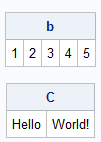
The %DEBUGPRINT macro (like all SAS macros) generates SAS statements. You can use OPTIONS MPRINT to see the code generated by any SAS macro. For this macro, the code is very simple. It generates an IF-THEN statement. If the first argument is true, it prints every subsequent argument. In the first call, the G_DEBUG symbol is true, so the program prints the symbols b and c. In the second call, the value is false, so the program does not print anything.
The first argument contain the value of a local variables, or it can be a global variable. If you use the GLOBAL option on the START statement to enable modules to access a global variable, you can easily toggle "debug mode" in which the modules print the values of local variables. For example, the following function uses the GLOBAL option to define a function that can access the G_DEBUG variable. When the variable is true, the function prints the name of the module and the arguments to the module.
start MyFunction(a, b) global(G_DEBUG); if G_DEBUG then run PrintLoc(); %DEBUGPRINT(G_DEBUG, a, b) return 1; finish; x = {1 2, 3 4}; y = {5 6}; G_DEBUG = 1; /* turn on global debugging flag */ z = MyFunction(x, y); /* printed output */ G_DEBUG = 0; /* turn off global flag */ z = MyFunction(x, y); /* nothing printed */ |

Summary
This article demonstrates two useful tips for debugging large SAS IML libraries in which there are many levels of nested module calls. The first technique uses the MODULESTACK function to print the name of a module or the complete call stack. The second technique is a macro that conditionally prints the values of local variables when a certain condition is true. You can combine the macro with a GLOBAL variable to quickly turn on and turn off printing as a debugging tool. The macro uses the PARMBUFF option, which enables the macro to take an arbitrary list of arguments.