I previously showed how to generate random numbers in SAS by using the RAND function in the DATA step or by using the RANDGEN subroutine in SAS/IML software. These functions generate a stream of random numbers. (In statistics, the random numbers are usually a sample from a distribution such as the uniform or the normal distribution.) You can control the stream by setting the seed for the random numbers. The random number seed is set by using the STREAMINIT subroutine in the DATA step or the RANDSEED subroutine in the SAS/IML language.
A random number seed enables you to generate the same set of random numbers every time that you run the program. This seems like an oxymoron: if they are the same every time, then how can they be random? The resolution to this paradox is that the numbers that we call "random" should more accurately be called "pseudorandom numbers." Pseudorandom numbers are generated by an algorithm, but have statistical properties of randomness. A good algorithm generates pseudorandom numbers that are indistinguishable from truly random numbers. The random number generator used in SAS is the Mersenne-Twister random number generator (Matsumoto and Nishimura, 1998), which is known to have excellent statistical properties.
Why would you want a reproducible sequence of random numbers? Documentation and testing are two important reasons. When I write SAS code and publish it on this blog, in a book, or in SAS documentation, it is important that SAS customers be able to run the code and obtain the same results.
Random number streams in the DATA step
The STREAMINIT subroutine is used to set the random number seed for the RAND function in the DATA step. The seed value controls the sequence of random numbers. Syntactically, you should call the STREAMINIT subroutine one time per DATA step, prior to the first invocation of the RAND function. This ensures that when you run the DATA step later, it produces the same pseudorandom numbers.
If you start a new DATA step, you can specify a new seed value. If you use a seed value of 0, or if you do not specify a seed value, then the system time is used to determine the seed value. In this case, the random number stream is different each time you run the program.
To see how random number streams work, each of the following DATA step creates five random observations. The first and third data sets use the same random number seed (123), so the random numbers are identical. The second and fourth variables both use the system time (at the time that the RAND function is first called) to set the seed. Consequently, those random number streams are different. The last data set contains random numbers generated by a different seed (456). This stream of numbers is different from the other streams.
data A(drop=i); call streaminit(123); do i = 1 to 5; x123 = rand("Uniform"); output; end; run; data B(drop=i); call streaminit(0); do i = 1 to 5; x0 = rand("Uniform"); output; end; run; data C(drop=i); call streaminit(123); do i = 1 to 5; x123_2 = rand("Uniform"); output; end; run; data D(drop=i); /* no call to streaminit */ do i = 1 to 5; x0_2 = rand("Uniform"); output; end; run; data E(drop=i); call streaminit(456); do i = 1 to 5; x456 = rand("Uniform"); output; end; run; data AllRand; merge A B C D E; run; /* concatenate */ proc print data=AllRand; run; |
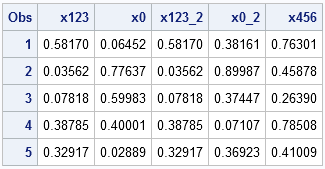
Notice that the STREAMINIT subroutine, if called, is called exactly one time at the beginning of the DATA step. It does not make sense to call STREAMINIT multiple times within the same DATA step; after the RAND function is called, subsequent calls to STREAMINIT are ignored. In the one DATA step (D) that does not call STREAMINIT, the first call to the RAND function implicitly calls STREAMINIT with 0 as an argument.
If a single program contains multiple DATA steps that generate random numbers (as above), use a different seed in each DATA step or else the streams will not be independent. This is also important if you are writing a macro function that generates random numbers. Do not hard-code a seed value. Rather, enable the user to specify the seed value in the syntax of the function.
Random number streams in PROC IML
So that it is easier to compare random numbers generated in SAS/IML with random numbers generated by the SAS DATA step, I display the table of SAS/IML results first:
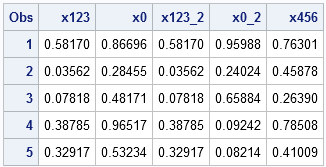
These numbers are generated by the RANDGEN and RANDSEED subroutines in PROC IML. The numbers are generated by five procedure calls, and the random number seeds are identical to those used in the DATA step example. The first and third variables were generated from the seed value 123, the second and fourth variables were generated by using the system time, and the last variable was generated by using the seed 456. The following program generates the data sets, which are then concatenated together.
proc iml; call randseed(123); x = j(5,1); call randgen(x, "Uniform"); create A from x[colname="x123"]; append from x; proc iml; call randseed(0); x = j(5,1); call randgen(x, "Uniform"); create B from x[colname="x0"]; append from x; proc iml; call randseed(123); x = J(5,1); call randgen(x, "Uniform"); create C from x[colname="x123_2"]; append from x; proc iml; /* no call to randseed */ x = J(5,1); call randgen(x, "Uniform"); create D from x[colname="x0_2"]; append from x; proc iml; call randseed(456); x = J(5,1); call randgen(x, "Uniform"); create E from x[colname="x456"]; append from x; quit; data AllRandgen; merge A B C D E; run; proc print data=AllRandgen; run; |
Notice that the numbers in the two tables are identical for columns 1, 3, and 5. The DATA step and PROC IML use the same algorithm to generate random numbers, so they produce the same stream of random values when given the same seed.
Summary
- To generate random numbers, use the RAND function (for the DATA step) and the RANDGEN call (for PROC IML).
- To create a reproducible stream of random numbers, call the STREAMINIT (for the DATA step) or the RANDSEED (for PROC IML) subroutine prior to calling RAND or RANDGEN. Pass a positive value (called the seed) to the routines.
- To initialize a stream of random numbers that is different each time you run the program, call STREAMINIT or RANDSEED with the seed value 0.
- To ensure independent streams within a single program, use a different seed value in each DATA step or procedure.

28 Comments
Pingback: Four essential functions for statistical programmers - The DO Loop
Pingback: How to Lie with a Simulation - The DO Loop
Pingback: Random number seeds: Only the first seed matters! - The DO Loop
Pingback: Generating a random orthogonal matrix - The DO Loop
Pingback: Is using zero as a random number seed the same as not specifying a seed? - The DO Loop
Hi Rick,
All your blogs are really informative, thank you.
I am trying to duplicate the results in a paper. The example they used was basically a sample of size 50 from a bivariate normal distribution, with seed(973). All great, I can use your code to get that. However, my sample means are not the same as theirs, and I assume it is because they used SAS 6.12, while I am using version 9.2.
Any way I could replicate their results?
Thank you,
Ionut
In SAS 6.12 they probably used RANNOR(973) rather than using STREAMINIT and RAND. You can try that. However, if they are using several random numbers in one program you might have trouble reproducing exactly. Remember that the sample mean is a random variable with standard error Cov/n = Cov/50 in your example. That means that the sample mean is bivariate normal N(xbar, Cov/50). As long as your sample mean is close to theirs, you have reproduced the results, even if it is not exactly the same number.
Pingback: Sampling with replacement: Now easier than ever in the SAS/IML language - The DO Loop
Hi, Rick. Your blog are very helpful. Thanks. Here is a question hope you can answer me.
Below are two simple data codes.
Code 1:
data rand123v1(drop=i);
call streaminit(123);
do i = 1 to 19;
x123 = rand("Uniform"); output;
end;
Code 2:
data classrand123 (drop=i);
set sashelp.class ;
call streaminit(123);
do i=1 to 19;
rand_id=rand('Uniform');
end;
run;
The question is why random numbers generated in above two data step are not identical while they are generated with the same seed. From my view, x123 and rand_id should be identical.
Thanks!
The DATA step contains an IMPLICIT loop over observations, so in the second program you are generating 19 random values for each observation and keeping the last. To get identical numbers, use this program for the second case:
Hi Rick,
The SAS documentation for RAND says that it uses the Mersenne Twister algorithm. Which instantiation of this algorithm does it use? Does it use mt19937? And how does STREAMINIT initialize the state vector? I need to verify RAND against other implementations of MT and need to know these details. Thanks.
These questions involve implementation details that could be considered proprietary, so I have no comment. You can send your question to SAS Technical Support.
Hello. This concept it new to me. I understand what a seed does in regards to -1, 0, and 1. If you enter in a number other than those like (12345) or (456) what do those specific values represent?
Thanks,
Deb
A seed initializes the algorithm that is used to create pseudorandom numbers. A seed of 0 (or negative) means use the current date and time to initialize the stream. A positive number between 1 and (2**31 -1) means explicitly initialize the stream. Each seed gives a different sequence of pseudorandom numbers.
Sorry, one additional question and it's a doozy. How do you simulate a beta distribution using a gamma distribution? Apparently older version of SAS don't have beta distribution.
You blog is a Godsend.
Thanks,
Deb
If you are using the RAND function, you should have the beta distribution. It has been there for a long time...maybe 15 years.
If your question is academic curiosity, then the answer is to simulate X~Gamma(a) and Y~Gamma(b). Then the ratio X/(X+Y) is Beta(a,b) distributed.
Yes, it's for school. The professor said to simulate a beta distribution because SAS does not have a beta distribution (as of SAS 9.3). We are using 9.2. So we needed to use gamma to generate beta. I was having a hard time following the lecture and there was no demo.
Thanks again,
Deb
Your professor is wrong. Use x = rand("Beta", 1, 2); and tell your classmates. Also tell them to read this article on why you should always use the RAND function.
Hello,
Thanks a lot for all your blogs. These are really helpful.
I am trying to configure co-variance based simulation in SAS Risk Dimension. I have used seed value as 54321 and have considered the twister random number generator. But the output is not getting tallied with the values generated by using RAND function in sas coding. Below is the piece of code which I tried to execute in SAS -
data test;
call streaminit(54321);
do i=1 to 10;
var1=rand('normal');
output;
end;
run;
Can you please help me with the issue.
I'm not an expert in SAS Risk Dimensions, but you are generating a 10-element vector of random values, whereas a covariance matrix is a square matrix with special properties. It might help to look at this example of covariance simulation analysis. If you still have questions, post your question to the SAS Risk Management Community.
Hello,
Is there way to generate random number with normal distribution and within specific numbers? E.g., generate xx numbers with normal distribution (mean= 80, std=20) and these numbers should between 0 to 120.
Can you let me know your solution?
Thanks!
Sure. Here are my thoughts on your question.
Pingback: How to generate random integers in SAS - The DO Loop
Pingback: How to choose a seed for generating random numbers in SAS - The DO Loop
dear rick
i tried to use the following code in your book from chapter 9, modifying it for 2 variables. ; however i get an execution error stating the specified distribution is not supported (basically i am trying to simulate correlated normal and lognormal data). what am i doing wrong ? many thanks
call randseed(1);
N = 100;
A = j(N,2); y = j(N,1);
distrib = {"Lognormal" "Norma1"};
do i = 1 to 2;
call randgen (y, distrib[i]);
A[,i] = y;
end;
The word "Normal" is misspelled. Your code has a "1" (the number one) instead of an "l" (the letter) at the end of the word. Correct the typo and the program will work.
Hello,
I am trying to understand the following code and wondered why two streaminits are used?:
data prior_fl;
call streaminit(4321);
do sample=1 to 10;
call streaminit(1234); /* what are each of the seed for? Is this the seed for the uniform or for the normal random numbers and the above for the prior?*/
p1=RAND('UNIFORM', 0, 1); /*p1 will be a proportion between 0 and 1 each proportion with equal probability*/
if p1<=&weight then do;
lghr=log((&upper-&lower)*rantri(&seed, (&mode-&lower)/(&upper-&lower))+&lower); *add my prior distribution here inside the log;
end;
else do;
lghr=(rand("Normal", 0, 0.00));
end;
truehr=exp(lghr);
obsHR_IA=exp(rand("Normal", lghr, sqrt(4/&ia)));
z_IA=(log(obsHR_IA))/sqrt(4/&ia);
obsHR_FA=exp((&ia/&fa)*log(obsHR_IA) + (1-(&ia/&fa))*rand("Normal", lghr,sqrt(4/(&fa-&ia))));
Only the first STREAMINIT call is used to set the random number seed, as I mention in this article and explain further in a second article. You can (and should) delete the second call to STREAMINIT. The result will be the same.
I will also mention that the call rand("Normal", 0, 0.00) will always return 0, so it is better to write lghr=0.