• Blog Directory

    blogs.sas.com RSS

    • BUSINESS LEADERSHIP

      • SAS Voices RSS

        News and views from the people who make SAS a great place to work
      • Closing the Intelligence Gap RSS

        Performance management and behavioral change management
      • Customer Analytics RSS

        Evolving relationships for business growth
      • Innsikt og Refleksjon RSS

        Nyheter og meninger om Business Analytics
      • Left of the Date Line RSS

        Business analytics from the Asia Pacific region
      • The Corner Office RSS

        SAS executives on the larger issues that affect a global business
      • The Principled Achiever RSS

        Winning business, earning trust
      • Value Alley RSS

        Your pathway from strategy to process to repeatable value creation
    • GETTING TECHNICAL

      • The SAS Dummy RSS

        A SAS® blog for the rest of us
      • The DO Loop RSS

        Statistical programming in SAS with an emphasis on SAS/IML programs
      • JMP Blog RSS

        Data visualization, statistical discovery, design of experiments, predictive modeling and more
      • Key Happenings at support.sas RSS

        Updates and advances in SAS online support
      • The SAS Training Post RSS

        SAS programming tips & tricks, certification advice, and classroom reports from SAS trainers
      • Real BI for Real Users RSS

        SAS BI tips, lessons learned, problems and successes
      • The SAS Bookshelf RSS

        The latest in SAS books, documentation, tips, and publishing trends
      • Graphically Speaking RSS

        Data Visualization with a focus on SAS ODS Graphics
      • SAS Users Groups RSS

        A snapshot of global users events, including best papers, presentations and innovative uses of SAS.
    • ANALYTICS IN ACTION

      • Subconscious Musings RSS

        Advanced analytics - from Research Drive to the world
      • The Text Frontier RSS

        Text mining, voice mining and unstructured data analysis
      • Data Roundtable RSS

        A community of experts sponsored by DataFlux
      • The Business Forecasting Deal RSS

        Exposing bad practices and offering practical solutions in business forecasting
      • Information Architect RSS

        IT defines what an enterprise can achieve
    • INDUSTRY INSIGHTS

      • The Analytic Insurer RSS

        Solving your customer, risk, fraud and operational challenges in insurance
      • A Shot in the Arm RSS

        Transforming quality, cost, and outcomes in the healthcare ecosystem
      • Generation SAS RSS

        Resources and tips for students and educators
      • Memex RSS

        Law enforcement and intelligence community technology
      • State and Local Connection RSS

        State and local governments using data to serve citizens and save money
      • The Analytic Hospitality Executive RSS

        Finding analytic solutions to your forecasting, pricing and operational challenges.

  • SAS Software
    • SAS Home
    • Products & Solutions
    • SAS News
    • Support & Training
  • Follow Us
    • SAS Software on Twitter
    • SAS Software on Facebook
    • SAS Software on YouTube
    • Communities on SAS
    • SAS RSS options
SAS Users Groups
A snapshot of global users events, including best papers, presentations and innovative uses of SAS.
Skip to content
  • Some of our blog content has moved
  • HTML Feed
SAS Blogs Home > SAS Users Groups > Setting up user permissions in SAS metadata
« Friday's Innovation Inspiration - Hiring for keeps
Extended login available for SAS web sites »

Setting up user permissions in SAS metadata

Wendy McHenry
Wendy McHenry|January 2, 2013
  • 1815
  • 0
  • Tweet

Happy New Year! If you have “adopting SAS metadata” as one of your New Year’s resolutions, I’m here to help you! In my last post in the metadata series, I shared with you all of the reasons why I love SAS metadata. I’d like to kick off 2013 with helping you get started with some of the most common SAS metadata tasks. The first step will be identifying users and setting user permissions.

The most vital piece of user information required by SAS is that each SAS user must have one external account ID. SAS will create its own copy of that ID to establish a unique SAS identity for each user that is connecting to SAS. All user permissions are then tied to that SAS identity.

Here are some rules of thumb:

  • If the metadata server is on Windows, users typically have Active Directory accounts.
  • If the metadata server is on UNIX, users might have UNIX accounts. Sometimes a UNIX host recognizes LDAP, Active Directory, or other types of accounts.
  • In a common alternate configuration, the metadata server trusts authentication that is performed at the Web perimeter. In this configuration, anyone who uses a Web application needs a Web realm account.

SAS Management Console is where you can make all of the metadata magic happen!

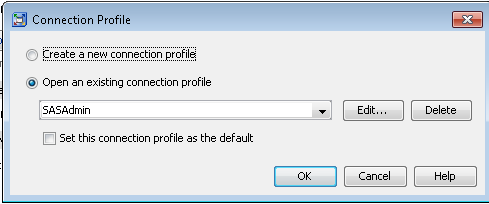
  1. Log in to the SAS Management Console as an administrator. For metadata administrators, it is appropriate to use a SAS internal account, like SASAdmin.
  1. Select the User Manager node on the Plug-Ins tab.
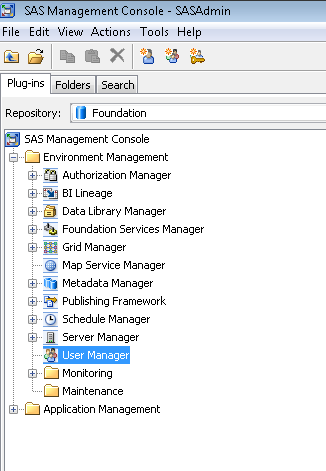
  1. Right click and select New -> User.

  1. On the General tab, enter the user information. Please note it is recommended that you avoid using spaces or special characters in the name of a user, group, or role that you create. Not all components will support spaces and special characters!
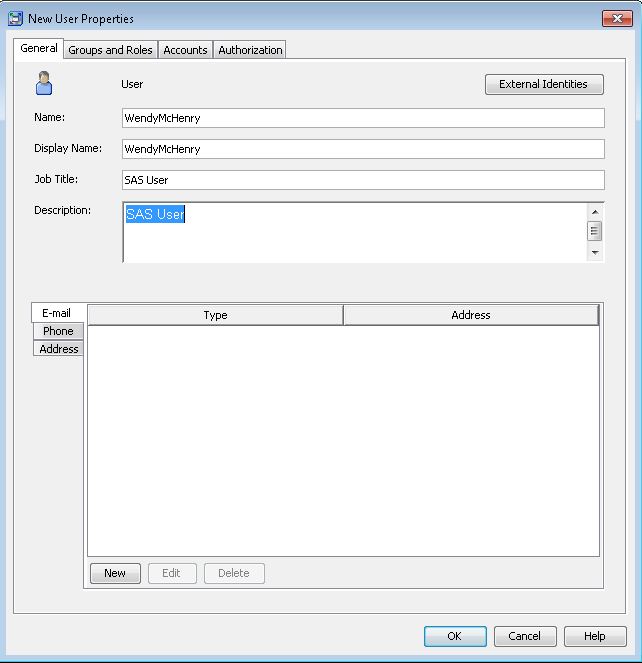
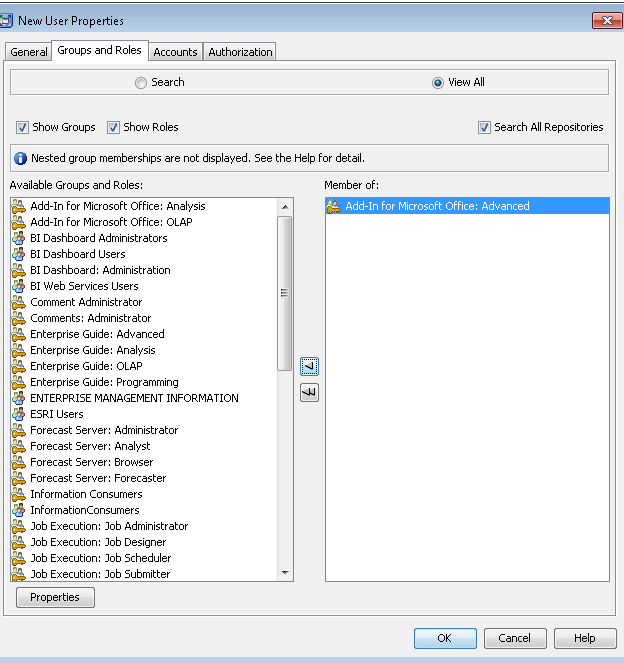
  1. On the Groups and Roles tab, select the appropriate groups and roles you’d like for that user. In future posts, we’ll look at creating custom groups and roles. If you are using this functionality for the very first time, the predefined groups are either very broad (PUBLIC, SASUSERS) or very narrow and highly privileged (SAS Administrators). The user automatically belongs to the group PUBLIC (which is everyone who can access the metadata server) and SASUSERS (those members of PUBLIC who have a well-formed user definition). The functionality you are looking for to control permissions to who can do what can be found right here!
  1. If you would like more information on the capabilities of each group or role, highlight the one you wish to investigate and the select Properties.
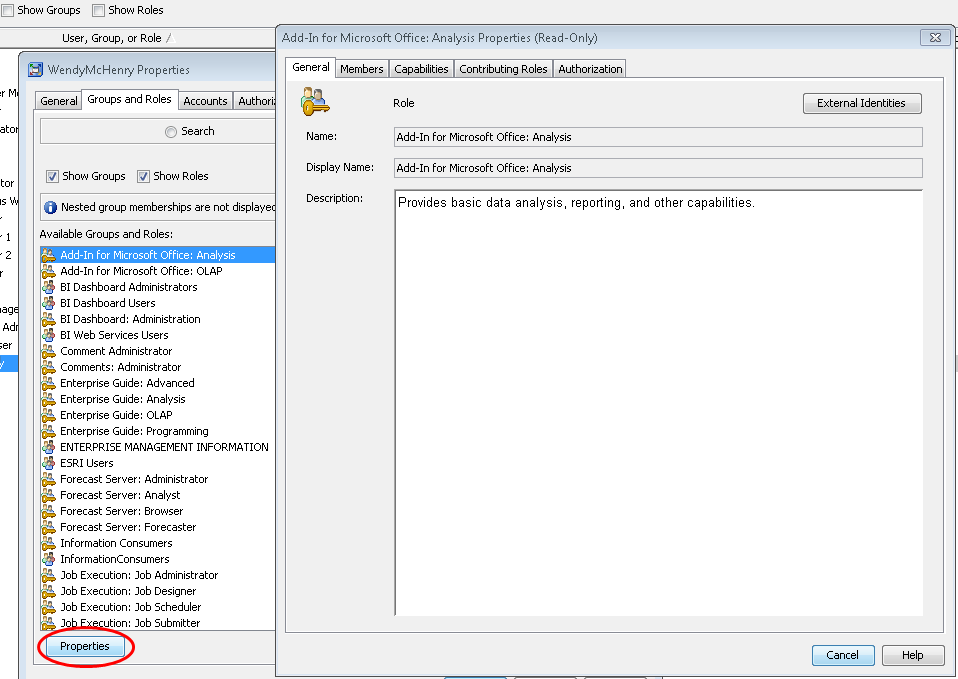
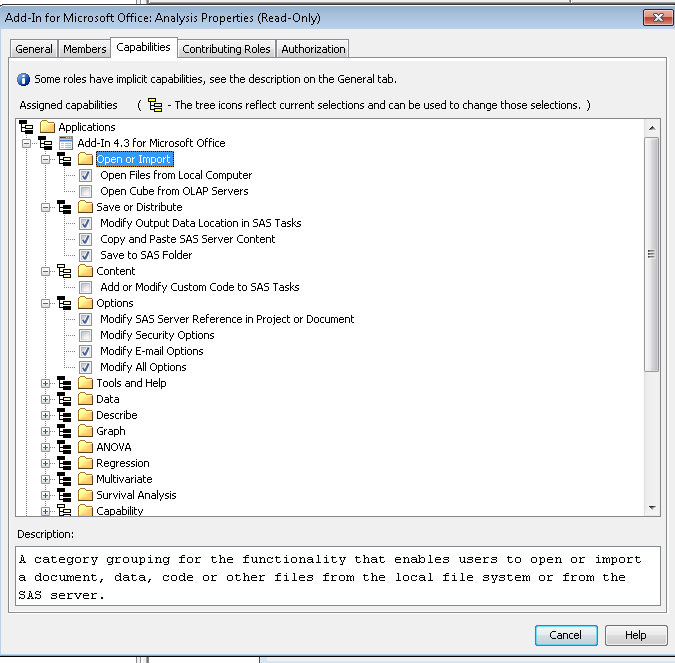
  1. From here, you can view the members that belong to that group or role, but the important part is the Capabilities tab. If you are an administrator, you will have the ability to set these capabilities.
  1. Select OK to get back to the main user properties window. On the Accounts tab, select New to begin adding a new user login.
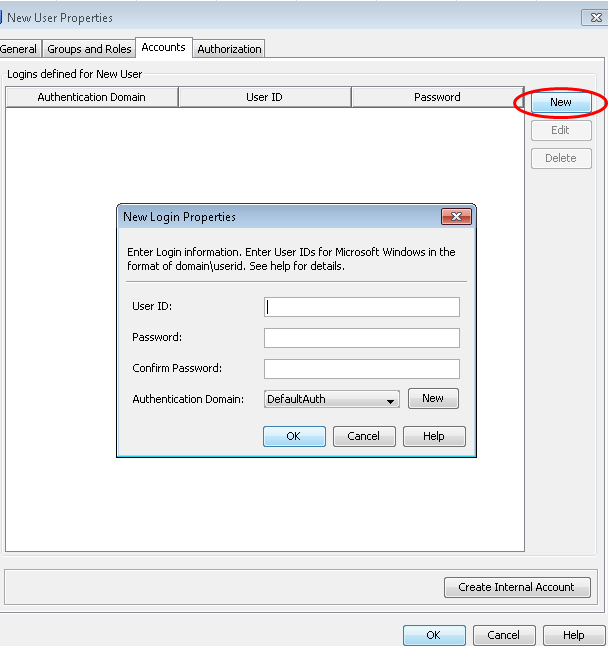
  1. As you are the SAS Administrator, just enter the userid. You can leave the password blank if it is a SAS userid. A third-party DBMS might require a different set of credentials, but your end-user can enter these credentials through a prompt in some applications, and through others by the use of the SAS Personal Login Manager.You will need to make sure you are selecting the correct authentication domain. An authentication domain is a name that will match the login with the server for which they are valid. The very simplest scenario is that all logins and SAS servers are associated with a single authentication domain, which is called DefaultAuth. Why would you need to add more authentication domains?
    • If you user Web authentication, you might need a different authentication domain for the login that contains the Web realm userid.
    • If you want to provide seamless access to a third-party server, like a database, that has its own user registry- you will need a separate authentication domain for that server and its logins.
    • If the standard workspace server does not share an authentication provider with the metadata server or you want seamless individualized access to the standard workspace server, you will need a separate authentication domain.

    Please make note of two important points for Windows accounts. If it is a Windows account, make sure you qualify the ID (for example WINuser or user@mycompany.com). Anyone using Windows host credentials to access a standard workspace server also must have the “Log on as a batch job” Windows privilege.
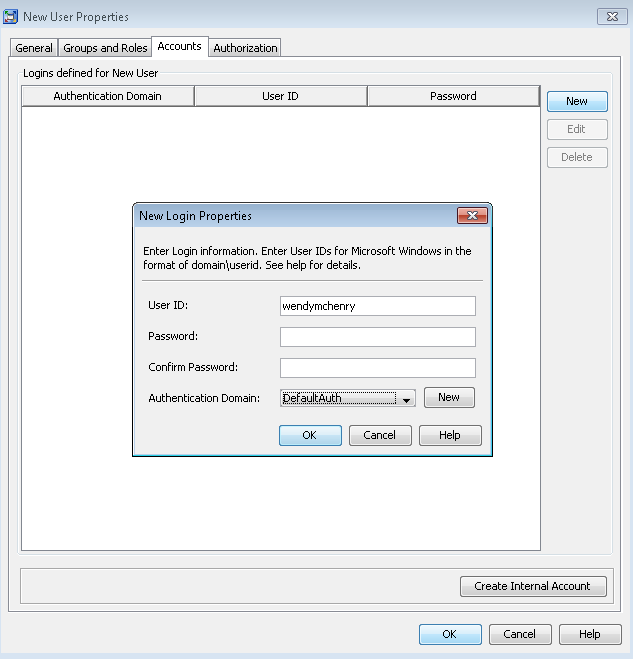
  1. Once you select OK, you can see the user’s login.

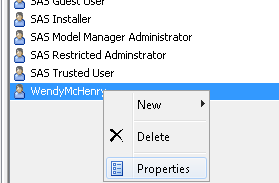
  1. Select OK without going to the final tab yet. Now scroll to the user within Management Console.

  1. Right click and select Properties.

On the final tab, the Authorization tab, does not determine what this user can see or do. Permission settings here affect the ability of restricted users to modify this user. User, group, and role definitions are primarily protected by role requirements.

Once you have added all of your users, you can then move on to other administrator tasks. Next time in our metadata series, we’ll take about configuring a server definition. I wish you all the best for a Happy and Healthy 2013. Happy New Year!

tags: metadata, SAS Administrators
  • delicious Bookmark on Delicious
  • digg Digg this post
  • facebook Recommend on Facebook
  • friendfeed Share on FriendFeed
  • linkedin Share on Linkedin
  • reddit share via Reddit
  • stumble Share with Stumblers
  • twitter Tweet about it
  • xing Share on xing
  • print Print for later
  • bookmark Bookmark in Browser
  • email Tell a friend
« Friday's Innovation Inspiration - Hiring for keeps
Extended login available for SAS web sites »
  • All code examples are provided as is, without warranty of any kind, either express or implied, including but not limited to the implied warranties of merchantability and fitness for a particular purpose. Recipients acknowledge and agree that SAS Institute shall not be liable for any damages whatsoever arising out of their use of this material. In addition, SAS Institute will provide no support for the materials contained herein.
  • Tags

    analytics base sas big data business analytics business intelligence call for papers chris hemedinger data mining data step Debbie Buck Executive Board Friday's Innovation Inspiration high-performance analytics IFSUG Inside SAS Global Forum Livestream macro metadata MWSUG NESUG papers & presentations personal agenda builder PharmaSUG proc programming SAS-L SAS Administrators sascommunity.org sas enterprise guide SAS Global Forum sas presenters series SAS Rock Stars sas training scsug SESUG social media social media analytics statistics student ambassador program tips & techniques twitter Unofficial Official Guide US Regional Conferences video wuss
 

blogs.sas.com RSS

  • BUSINESS LEADERSHIP

    • SAS Voices RSS

      News and views from the people who make SAS a great place to work
    • Closing the Intelligence Gap RSS

      Performance management and behavioral change management
    • Customer Analytics RSS

      Evolving relationships for business growth
    • Innsikt og Refleksjon RSS

      Nyheter og meninger om Business Analytics
    • Left of the Date Line RSS

      Business analytics from the Asia Pacific region
    • The Corner Office RSS

      SAS executives on the larger issues that affect a global business
    • The Principled Achiever RSS

      Winning business, earning trust
    • Value Alley RSS

      Your pathway from strategy to process to repeatable value creation
  • GETTING TECHNICAL

    • The SAS Dummy RSS

      A SAS® blog for the rest of us
    • The DO Loop RSS

      Statistical programming in SAS with an emphasis on SAS/IML programs
    • JMP Blog RSS

      Data visualization, statistical discovery, design of experiments, predictive modeling and more
    • Key Happenings at support.sas RSS

      Updates and advances in SAS online support
    • The SAS Training Post RSS

      SAS programming tips & tricks, certification advice, and classroom reports from SAS trainers
    • Real BI for Real Users RSS

      SAS BI tips, lessons learned, problems and successes
    • The SAS Bookshelf RSS

      The latest in SAS books, documentation, tips, and publishing trends
    • Graphically Speaking RSS

      Data Visualization with a focus on SAS ODS Graphics
    • SAS Users Groups RSS

      A snapshot of global users events, including best papers, presentations and innovative uses of SAS.
  • ANALYTICS IN ACTION

    • Subconscious Musings RSS

      Advanced analytics - from Research Drive to the world
    • The Text Frontier RSS

      Text mining, voice mining and unstructured data analysis
    • Data Roundtable RSS

      A community of experts sponsored by DataFlux
    • The Business Forecasting Deal RSS

      Exposing bad practices and offering practical solutions in business forecasting
    • Information Architect RSS

      IT defines what an enterprise can achieve
  • INDUSTRY INSIGHTS

    • The Analytic Insurer RSS

      Solving your customer, risk, fraud and operational challenges in insurance
    • A Shot in the Arm RSS

      Transforming quality, cost, and outcomes in the healthcare ecosystem
    • Generation SAS RSS

      Resources and tips for students and educators
    • Memex RSS

      Law enforcement and intelligence community technology
    • State and Local Connection RSS

      State and local governments using data to serve citizens and save money
    • The Analytic Hospitality Executive RSS

      Finding analytic solutions to your forecasting, pricing and operational challenges.

The blog content appearing on this site does not necessarily represent the opinions of SAS. Your use of this blog is governed by the Terms of Use and the SAS Privacy Statement.

Copyright © SAS Institute Inc. All Rights Reserved